In this in-depth UN/EDIFACT EDI Standard Guide, you’ll learn:
EDIFACT (UN/Electronic Data Interchange for Administration, Commerce and Transport) is the international standard for electronic business document exchange, approved as ISO 9735 in 1987. It carries more than 200 standard business messages, which lets trading partners exchange structured data across countries and industries. EDIFACT dominates European, Asian, and global logistics markets.
The standard stays adaptable through industry subsets such as EANCOM (consumer goods), ODETTE (automotive), and CEFIC (chemicals), while the core rules stay intact. Success requires understanding both the technical structure and the business context, and modern tooling removes the coding requirement for most implementations. EDIFACT is one of the most widely used EDI standards in use today, yet many businesses struggle to implement it correctly.
You can transform your electronic data interchange processes by understanding what EDIFACT is and how this UN-developed standard works. The EDIFACT standard provides a structured method to exchange business documents across countries and industries, and UNECE currently publishes more than 200 standard message types within it.
This guide walks you through everything from basic EDIFACT format and structure to advanced implementation techniques, with practical EDIFACT examples to get you started.
EDIFACT is an international standard developed for the United Nations and approved by UNECE.
It defines the syntax that structures data for over 200 business documents.
United Nations/Electronic Data Interchange for Administration, Commerce and Transport is an international standard developed for the United Nations and approved by UNECE, the UN Economic Commission for Europe. The UN/EDIFACT Syntax Rules were approved as ISO standard ISO 9735 by the International Organization for Standardization in 1987, following the convergence of the UN and US/ANSI syntax proposals.
The standard comprises internationally agreed standards, directories and guidelines for the electronic interchange of structured data between independent computerized information systems. The United Nations Centre for Trade Facilitation and Electronic Business (UN/CEFACT), under the UN Economic Commission for Europe, maintains these rules, with finance messages handled by the UN CEFACT TBG5 working group.
EDIFACT defines the syntax that structures data for over 200 business documents. These include invoices, orders and dispatch notes, and they let partners exchange information without ambiguity. A single organization typically works with two to eight business document types in practice, though the standard supports far more diverse international transactions. Commport publishes a full UN/EDIFACT transactions list if you want to see the complete message inventory.
The main difference between EDIFACT and X12 lies in geographic deployment and document identification. X12 dominates North America. EDIFACT serves as the international standard across Europe, Asia-Pacific, South America, and global logistics networks. Most manufacturers with international supply chains support both standards at the same time. Commport covers the practical trade-offs in its ANSI X12 vs UN/EDIFACT comparison.
EDIFACT uses six-character alphanumeric codes to identify message types, such as ORDERS for purchase orders and INVOIC for invoices. X12 employs three-digit numeric codes such as 850 for purchase orders and 810 for invoices. For planning schedules, EDIFACT uses DELFOR, whereas X12 uses 830.
One vendor analysis of North American manufacturers reports that roughly 80 percent of trading partners require X12 and 20 percent require EDIFACT, with the ratio shifting as international channels are added. Treat that split as a vendor-reported estimate rather than an industry census. EDIFACT dominates EU markets, particularly in automotive, consumer goods and retail supply chains.
The delimiters differ between the two standards. EDIFACT uses an apostrophe (‘) between segments, a plus sign (+) between elements, and a colon (:) between composite elements. Partners can customize these characters to avoid conflicts with data content. X12 uses different separator characters entirely.
The EDIFACT standard rests on four fundamental components:
The standard provides a set of syntax rules that structure data at the application level. These rules define how data elements, segments, and messages are formatted and organized.
EDIFACT includes an interactive exchange protocol (I-EDI) that governs immediate data communication between systems.
The framework offers standard messages for multi-country and multi-industry exchange. That standardization lets businesses in different regions communicate in a common format.
EDIFACT uses a hierarchical structure in which the top level is an interchange. It contains multiple messages composed of segments, which consist of composites that break down into elements drawn from the United Nations Trade Data Element Directory (UNTDED).
Groups and segments can be mandatory (M) or conditional (C) with specified repetition allowances. C99 indicates between 0 and 99 repetitions of a segment or group, while M99 signifies between 1 and 99 repetitions.
EDIFACT adoption delivers measurable operational improvements. Automated message validation flags errors before they reach trading partners, and you keep control over data integrity across internal systems.
Electronic data exchange eliminates paper-based transactions. That cuts printing, postage and processing costs while removing manual data entry labour. Automation also speeds up data transfer between organizations.
The standard has global acceptance across transportation, finance, retail and healthcare. An internationally recognized standard streamlines business processes and improves supply chain efficiency. Commport maintains a broader breakdown of the industries that use EDI every day.
EDIFACT supports message types ranging from purchase orders to shipping notices, which supports detailed business communication. The structured format improves data accuracy and completeness by defining consistent exchange formats.
Greater visibility within the supply chain removes unknowns and can reduce inventory holding levels. Businesses also avoid logging into customers’ trading portals manually, because a single electronic communication method carries orders, invoices and other messages.
EDIFACT file format follows a hierarchical structure. The messages are divided into three distinct sections.
Heading section, detail section, and summary section.
The EDIFACT format follows a hierarchical structure approved as ISO 9735, in which data is organized into distinct levels running from the interchange down to individual elements. The International Standard sets condensed rules for structuring user data and associated service data in message interchange within open environments. Commport’s guide to EDI file structure covers the same layering in plain language.
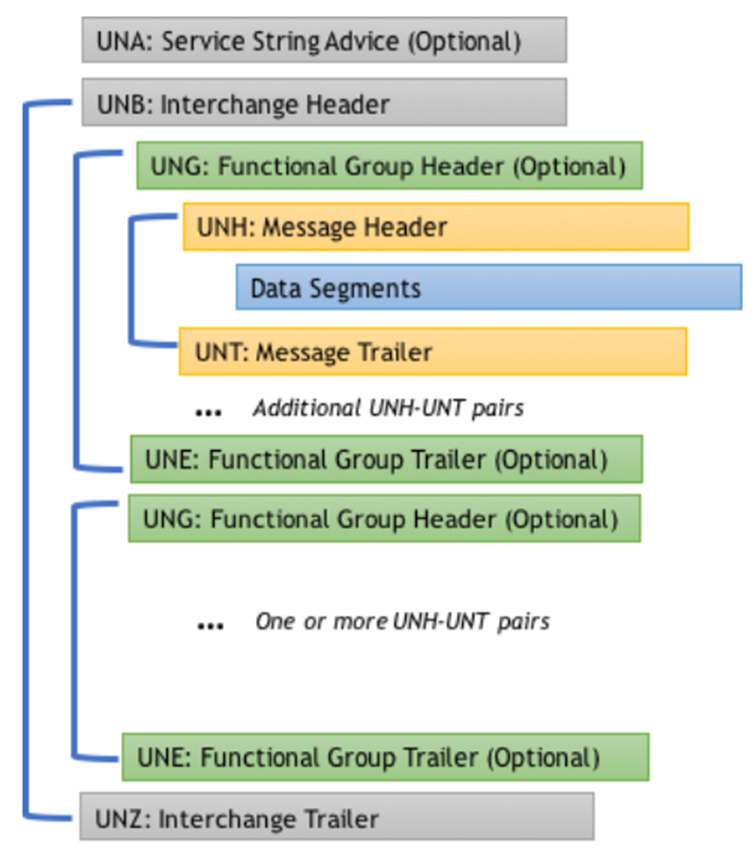
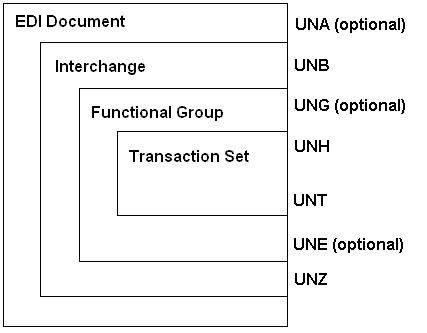
An interchange consists of service segments and user data segments arranged in a specific sequence. Service segments create the electronic envelopes that package EDIFACT messages, and you can identify them by their “UN” prefix. The structure flows from the Service String Advice (UNA) if present, followed by Interchange Header (UNB), optional Functional Group Header (UNG), Message Header (UNH), user data segments, Message Trailer (UNT), optional Functional Group Trailer (UNE), and Interchange Trailer (UNZ).
Messages themselves divide into three distinct sections. The heading section contains segments that relate to the entire message, while the detail section holds segments specific to line-item information. The summary section carries only segments containing totals or control information, such as invoice total amounts or line counts in purchase orders.
The UNA segment plays a critical role when present, though it remains optional. This segment has a mandatory fixed length of nine characters. The first three characters spell “UNA” and are followed by six characters that define delimiters and indicators for the entire interchange. Those six characters appear in this order: component data element separator (typically :), data element separator (typically +), decimal mark (typically .), release character (typically ?), a reserved space, and segment terminator (typically ‘).
The comma served as the default decimal mark before version 4, which confused many users. Version 4 syntax rules specify that both comma and point may be used interchangeably in numeric data values.
The UNB segment states which syntax version applies to the interchange. This interchange header identifies the sender and recipient, records the date and time of preparation, and assigns a unique interchange control reference. The corresponding UNZ segment closes the interchange and checks its completeness through a control count of messages or functional groups.
Each EDIFACT message begins with the UNH segment and concludes with the UNT segment. Together they form the innermost level of the electronic envelopes, and both are mandatory for every message. A message must contain at least one user data segment with at least one user data element.
The UNS segment is a service segment that separates header, detail, and summary sections where necessary to avoid ambiguity. It contains the value “D” to delimit the header from the detail section and “S” to separate detail from summary.
Segments can appear individually or as part of segment groups. A segment group holds functionally related segments that may repeat, with maximum repetitions specified in the message definition. These groups can nest within other segment groups, provided inner groups terminate before outer groups close.
An EDIFACT segment is a collection of related data elements in a fixed, defined sequence. Each segment carries a three-character alphanumeric code called the segment tag, followed by variable-length data elements that can be either simple or composite.
Segments are separated using a data element separator (the plus sign + is normal) and terminate with a segment terminator (the apostrophe ‘ is normal). The segment tag may carry optional nesting and repeating indication values where explicit indication is required.
Data elements are the smallest unit of information within a message structure. A simple data element contains one piece of information. A composite data element groups two or more component data elements to express related information in structured form. Component data elements are separated using the colon (:) as the typical delimiter.
EDIFACT identifies values through positional notation within segments. Every data element counts by its position, even when optional or conditional elements contain no data. Empty elements still require their separators to hold correct positioning, unless they fall at the end of a segment.
Numeric values follow specific representation rules. The decimal mark does not count as a character when computing maximum field length, though the transmission must allow for it. At least one digit must appear before and after the decimal mark when it is transmitted. Numeric data element values count as positive unless preceded by a minus sign.
Variable-length data elements suppress insignificant character positions. Because segments and data elements vary in length, there is no need to pad content with blanks or zeros. Only segments and elements that carry actual content travel in the message, which saves considerable transmission overhead.
Release characters let you transmit reserved delimiter characters as data. A delimiter sent as data must be preceded with a question mark, and a question mark in data must be preceded with another question mark. The release character does not count within the maximum length defined for a data element.
100% EDI Compliance Guaranteed!
Here are some of the important EDIFACT segments.
UNB (Interchange header segment), UNH (message header segment), BGM (beginning of message segment), NAD (name and address segment), UNT and UNZ (trailer segments).
Segments are the functional units that carry specific business data within every EDIFACT transmission. Each segment type performs a distinct role, from identifying trading partners to specifying document types and proving message integrity.
UNB: Interchange header segment
UNH: Message header segment
BGM: Beginning of message segment
NAD: Name and address segment
UNT and UNZ: Trailer segments
The UNB segment initiates and identifies an interchange. This mandatory segment carries the syntax identifier in composite S001, where data element 0001 specifies the character set. UNOA represents UN/ECE level A complying with ISO 646, UNOB adds lowercase letters, UNOC follows ISO 8859-1, while UNOD, UNOE and UNOF handle ISO 8859-2, Cyrillic and Greek respectively. Data element 0002 gives the syntax version number and increments with each new version.
Composite S002 identifies the interchange sender through data element 0004. S003 specifies the recipient in data element 0010. S004 captures the date and time of preparation in YYMMDD and HHMM format. The interchange control reference in data element 0020 is a unique identifier the sender generates. Data element 0035 serves as the test indicator: setting it to 1 flags the interchange as test data rather than production.
The UNH segment heads and identifies each message with a unique message reference number in data element 0062. Composite S009 contains the message identifier. Data element 0065 specifies the message type (such as INVOIC or ORDERS), 0052 gives the version number, 0054 shows the release number and 0051 identifies the controlling agency. Data element 0057 carries an association assigned code where applicable.
The BGM segment indicates the document type and function while transmitting the identifying number. Composite C002 contains data element 1001 for the document name code. Common values are 380 for commercial invoices, 381 for credit notes, 220 for purchase orders, and 351 for dispatch advice. Data element 1004 in composite C106 holds the unique document identifier assigned by the sender.
Data element 1225 specifies the message function code. Code 9 indicates an original transmission, 5 represents a replacement, 1 denotes cancellation, 31 marks a copy, and 4 signals a change request. This function code applies to all data within the message.
The NAD segment identifies parties involved in transactions through data element 3035, the party function qualifier. BY designates the buyer, SU identifies the supplier, DP indicates the delivery party, IV specifies the invoicee, and SE marks the seller. Composite C082 contains the party identifier in data element 3039. It often uses Global Location Numbers (GLN) with code 9 in data element 3055 to identify GS1 as the responsible agency.
The UNT segment ends the message and checks its completeness. Data element 0074 counts all segments in the message, including UNH and UNT. Data element 0062 must match the reference number from the corresponding UNH segment.
The UNZ segment closes the interchange. Data element 0036 tallies the number of messages or functional groups within the interchange. Data element 0020 must match the control reference from the UNB segment.
The optional UNA segment defines delimiters with a fixed length of nine characters. It specifies the component separator, element separator, decimal mark, release character, reserved space, and segment terminator. The functional group segments UNG and UNE envelope multiple messages of the same type. The UNS segment separates message sections and contains “D” when dividing header from detail or “S” when separating detail from summary.
Common EDIFACT message types include INVOIC (processing invoice message), DESADV (Handling dispatch advice), ORDERS, and ORDRSP (order management)
UNECE reports that the standard currently contains 209 business messages, covering diverse business transactions across many industries. The United Nations Economic Commission for Europe publishes new EDIFACT versions twice a year, updating existing messages and introducing new ones as business needs change.
Industry associations have tailored EDIFACT directories into specialized subsets. EANCOM serves the consumer goods industry, CEFIC addresses chemical sector needs, and EDI Energy covers energy industry requirements. ODETTE supports automotive manufacturers. These subsets stay EDIFACT compliant while addressing sector-specific transaction patterns. Commport’s guide to 10 common EDI communication standards sets these subsets side by side.
The INVOIC message claims payment for goods or services supplied under conditions agreed between seller and buyer. The message type serves multiple functions, covering original invoices and credit notes.
EDIFACT INVOIC D96A is the most prominent version release and dates back to 1996. A typical invoice message carries the invoice number and date in the BGM and DTM segments. It also carries payment terms, shipment references, and item details with charges, along with any applicable surcharges or discounts. The LIN segment carries line item information, MOA segments handle monetary amounts, and PRI segments specify price details.
Suppliers generate the INVOIC in their ERP system and transmit it to customers when processing invoice messages. The receiving system validates the message against specifications and may return a functional acknowledgment. The EDI 810 invoice is the X12 equivalent in North America, and the automotive industry uses the VDA4906 and VDA4938 standards.
The DESADV message works as an electronic packing slip that shares delivery and shipment details for goods dispatched or ready for dispatch. It states what is arriving and when it is expected, and it shows how the shipment is packed.
A DESADV typically carries order references, shipment details, and delivery dates and times. Item data with product codes, pallet and package numbers, weights and dimensions form part of the message, and expiration dates and dock locations complete the information. The message relates to one seller and one buyer. It covers a single dispatch point and single or multiple destination points.
Common versions are DESADV D96A, D97A and D01B. The automotive industry relies heavily on DESADV in Just-in-Time workflows, where small deviations can affect production lines. The X12 equivalent is the 856 Ship Notice/Manifest, also known as an Advance Shipping Notice.
The ORDERS message contains requests for the supply of goods or services and works as the purchase order in electronic format. Key information includes order numbers, required and delivery dates, and supply contract references. Prices with tax qualifiers and party identifiers for consignee, sender, delivery location, and carrier complete the message. The North American equivalent is the EDI 850 purchase order.
ORDRSP serves as the purchase order response, where suppliers confirm, reject, or modify buyer orders. Message function codes show the response type. Code 12 signals “not processed” and 27 means “not accepted.” Code 29 shows “accepted without amendment,” while 28 indicates “accepted with amendment in heading section.” Code 30 designates “accepted with amendment in detail section.”
Customs messages make cross-border trade easier. CUSCAR transmits customs cargo reports, and CUSDEC handles customs declarations. CUSEXP processes express consignment declarations. CUSRES provides customs response messages that acknowledge receipt and show acceptance or rejection status.
IFTMIN is the instruction message from shipper to carrier for transport operations, and it contains final consignment details. This single-consignment message works alongside booking messages and arrival notices, and it creates transport contracts for administrative and operational purposes.
In this chapter, we will decode some important EDIFACT message sample files.
Actual message samples accelerate EDIFACT mastery more than theoretical study alone. Real-life examples show how segments, elements and delimiters combine into functional business documents.
A purchase order message demonstrates the standard’s practical structure. The ORDERS message places requests for goods or services and contains buyer and seller identifiers, line items with product codes, quantities, and prices. Each segment carries specific business information while maintaining the hierarchical envelope structure.
The interchange header UNB identifies sender BUYER123 and receiver SELLER456. The message header UNH specifies ORDERS version D96A and follows next. The BGM segment with code 220 indicates a blanket order with reference PO-2024-001. Date segments capture both order creation and requested delivery dates using qualifier codes 137 and 2.
Party identification relies on NAD segments with qualifiers BY for buyer and SU for supplier. These segments often carry Global Location Numbers for precise identification. Product details appear in LIN segments containing EAN/GTIN codes. QTY segments with qualifier 21 specify ordered quantities, and PRI segments with qualifier AAA indicate unit prices.
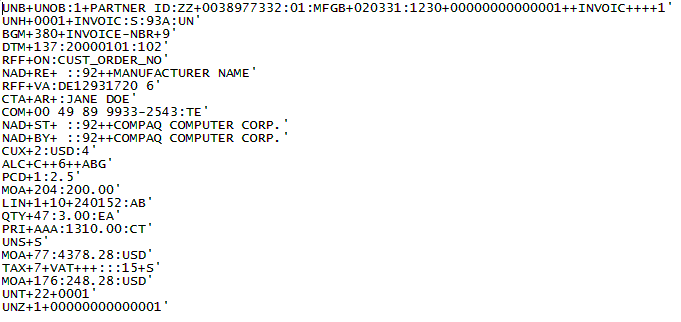
The INVOIC message bills for delivered goods or services. A typical invoice carries document type 380 in the BGM segment, which distinguishes it from credit notes (381) or debit notes. Reference segments link back to originating purchase orders using qualifier ON.
Line item amounts appear in MOA segments with qualifier 203. Tax calculations use TAX segments that specify VAT rates. The summary section carries the critical totals: MOA+77 for invoice total excluding tax, MOA+176 for total tax amount, and MOA+79 for the total including tax. This structure lets receiving systems reconcile invoices automatically.
A minimal interchange demonstrates the required components. The structure needs only UNB to open the interchange, UNH to start the message, BGM for document identification, UNT to close the message and UNZ to end the interchange. This five-segment transmission is the smallest valid EDIFACT file.
Standard separators are the apostrophe for segment termination, the plus sign for data element separation and the colon for component element division. Messages follow syntax version D96A, which maintains wide support across trading partner systems.
Dispatch advice messages notify buyers of shipped goods. The DESADV uses document code 351 in BGM and carries estimated delivery dates with DTM qualifier 11. Carrier information appears in TDT segments. Consignment packing sequences in CPS segments organize shipment hierarchies, while PCI segments carry tracking numbers.
Order response messages confirm receipt with acceptance codes. Line qualifiers indicate status: code 5 signals accepted, and code 3 shows changed quantities. Buyers therefore receive modifications back through the same message.
Unlock the full potential of your supply chain with our comprehensive EDI Buyer's Guide — your first step towards seamless, efficient, and error-free transactions
EDIFACT board publishes two directory variants each year. One in April named Variant A, and the other in October named Variant B. Each new directory adds message types and expands the range of transmissible data elements.
The UN/CEFACT Board publishes two EDIFACT directory variants each year, identified by publication year and suffix. Variant A releases on April 1 and variant B becomes available on October 1, which UNECE confirms as a twice-yearly publication cycle. The naming convention produces identifiers such as D.96A, D.01B and D.07A.
Each new directory adds message types and expands the range of transmissible data elements. Older EDIFACT directories remain valid after new releases, so trading partners can continue using agreed-upon versions such as D96A without mandatory upgrades. Large-scale market participants request version changes every three to six years to gain expanded semantic data scope and improved data quality.
GS1 EANCOM is a subset of UN/EDIFACT that contains only the message elements business applications require, omitting optional elements irrelevant for GS1 users. The subset integrates GS1 standards for trade item identification with logistics units and Global Location Numbers. EANCOM exists in three versions: D93A, D96A and D01B, and each contains 46 message types for consumer goods business processes.
The version number appears in data element 0057 within the UNH message header segment, such as EAN007 for EANCOM version 7. Other industry-specific subsets include EDIG@S for gas company document exchange and EDITEC for technical industries. EDITEC versions maintain defined maximum specifications, which keep message types identical across versions and make EDI implementations reproducible.
EDIFACT supports multiple character sets identified in the UNB1.1 syntax identifier: UNOA, UNOB, UNOC, UNOD, UNOE, UNOF, UNOG, UNOH, UNOI, UNOJ, UNOK, UNOX and UNOY. UNOA serves as the recommended default for international exchanges. Each character set maps to specific ISO encodings. UNOC uses Latin-1, UNOD employs ISO-8859-2 for Slavic languages, UNOE handles Cyrillic with ISO-8859-5, and UNOF supports Greek through ISO-8859-7. The character set specification in UNB1 determines encoding for the entire interchange.
Before exchanging messages with trading partners, you need working infrastructure that handles message creation, validation and transmission. Modern EDIFACT implementations carry less technical overhead than legacy systems, and setup is within reach even for organizations without extensive EDI experience. Commport’s EDI implementation guide walks through the same sequence step by step.
Modern EDI tools remove the coding requirement. Commport Communications provides a platform with support for EDIFACT and its subsets without custom code. Legacy on-premise installations carried far heavier requirements: vendor documentation for the Oracle SeeBeyond EDIFACT library, for example, specified Windows NT or Windows 2000, 128 MB RAM, 100 MB free disk space and Java Runtime Environment 1.4 or higher. Those figures reflect early-2000s software and are not a benchmark for current deployments.
External infrastructure matters just as much. You need a compatible database system to store transaction data, network connections for EDI communications, and internet access to download updates and documentation. Commport EDI Solutions supports all major EDI standards and 5,000+ trading partners worldwide, and Commport publishes that its platform is trusted by over 6,000 customers, with straightforward setup, expandability, and affordable pricing options to get started.
Configuration begins with protocol setup. Access the Hosts page in Partner Management and select your host, then open the Protocols tab to configure EDIFACT through the General, Preprocessing, Logging, and Advanced tabs. You must specify document schema categories to validate and index inbound documents in search tables.
Delimiter configuration proves critical. Set the element delimiter (usually +), segment termination character (usually ‘) and composite delimiter (usually 🙂 for outbound messages. Include the UNA segment when writing if partners require explicit separator definitions. Syntax identifier selection in UNB01 determines character set handling, and UNOA is the recommendation for international exchanges. Commport’s EDI translation and mapping services handle this configuration work for partners who would rather not maintain it in-house.
Start by collecting each partner’s EDI Implementation Guides and onboarding checklists. These documents define required transaction sets, versions, communication protocols, envelope structures, and business rules. Document interchange IDs, qualifiers, DUNS or GLN numbers, mailbox locations, and support contact paths early. Commport’s new trading partner setup checklist covers the same ground from the onboarding side.
Define trading partner profiles in your EDI system with communication settings that include protocols and endpoints. Configure the EDIFACT Standard tab with interchange identification options, and specify the UNB02 sender ID for outbound and the UNB03 receiver ID for inbound interchanges. Protocol choice matters here too, and Commport compares the options in its guide to EDI communication protocols, including AS2.
Create formal test plans that map each partner requirement to test cases and acceptance criteria. Execute message-level and end-to-end tests, then validate control numbers, segment counts and acknowledgment handling before production deployment. Commport’s overview of EDI testing sets out the test types most partners expect to see.
Data exchange works only when messages comply with UNECE standards before transmission. File definition rules cover elements, segments, and loops. Element-level checks verify minimum and maximum lengths, qualified elements through codelist lookups, data types (string or number), and mandatory versus optional status. Required fields, maximum usage counts, and looping group structures must pass segment validation.
Validation settings need syntax set configuration for alphabetic and alphanumeric data elements. UNOA permits uppercase letters and digits, and UNOB adds lowercase characters. Standard sets sometimes prove insufficient, in which case custom syntax sets enable specific character validation through regular expressions for individual data elements. Commport catalogues the failure patterns worth watching in its rundown of 15 common EDI errors.
The CONTRL message serves as both technical and functional acknowledgment for EDIFACT interchanges. Technical acknowledgments confirm receipt and syntactic accuracy of envelope components, and UCI4 action codes report accepted or rejected status. Functional acknowledgments verify message content semantics, checking for fatal syntactic errors and semantic correctness. The X12 counterpart is the EDI 997 functional acknowledgement.
UCI5 error codes identify specific conditions: code 12 indicates invalid values, 13 signals missing elements, 21 marks invalid characters, and 26 detects duplicates.
Compliance requirements vary substantially between regions. European Union partners must adhere to GDPR regulations when transmitting personal information through EDIFACT messages. Industries impose additional requirements. Automotive supply chains follow VDA standards, retail operations mandate GS1 product identification codes, and healthcare implementations require HIPAA security measures with audit trails.
Track successful versus failed transaction percentages to gauge system performance. Email notifications alert teams in real time when transactions fail, acknowledgments go missing or processing exceeds defined thresholds. Commport sets out the full monitoring routine in its guide to EDI management best practices.
You now have a complete roadmap for implementing EDIFACT in your organization. This guide covered basic syntax rules and segment structures through to validation, compliance and partner setup. EDIFACT remains the dominant international EDI standard, and working knowledge of it opens the door to global trade partnerships.
Start with the fundamentals and practice with the examples above. Build your EDIFACT expertise gradually. Proper planning, complete testing and ongoing compliance with trading partner requirements are what carry a project through.
Take it step by step, and you will be exchanging business documents with partners worldwide sooner than you expect.
EDIFACT (Electronic Data Interchange for Administration, Commerce and Transport) is an international standard developed by the United Nations for exchanging structured business documents electronically. It matters because it lets businesses in different countries and industries communicate in a common format, supporting more than 200 business document types including invoices, purchase orders and shipping notices. The standard is particularly dominant in Europe, Asia-Pacific and global logistics networks.
The main differences lie in geographic usage and document identification methods. EDIFACT is the international standard used primarily in Europe, Asia-Pacific and South America, while X12 dominates North America. EDIFACT uses six-character alphanumeric codes to identify message types (such as ORDERS for purchase orders), whereas X12 uses three-digit numeric codes (such as 850). The two also use different delimiter characters: EDIFACT typically uses apostrophes, plus signs and colons, while X12 employs different separators.
Every EDIFACT message contains several key segments. UNB (Interchange Header) identifies the sender and receiver. UNH (Message Header) specifies the message type and version. BGM (Beginning of Message) indicates the document type and function. NAD (Name and Address) identifies parties involved in the transaction. UNT and UNZ (trailer segments) close the message and validate its completeness by counting segments.
Modern EDIFACT implementation requires EDI software that supports message creation, validation and transmission. You need a compatible database system for storing transaction data, network connections for EDI communications, and internet access for updates. Many current platforms remove the coding requirement and offer user-friendly interfaces. You also need to configure communication protocols, set up trading partner profiles and establish proper delimiter configurations.
Validation is essential and should check element lengths, data types, mandatory fields and segment structures against UNECE standards before transmission. Use CONTRL acknowledgment messages to confirm receipt and verify both technical and functional accuracy. Maintain compliance with regional regulations such as GDPR in Europe and with industry-specific requirements. Monitor transaction success rates, set up real-time error notifications, and conduct thorough testing with trading partners before moving to production.