


Introduction to EDI Labels
EDI label automation transforms your supply chain from error-prone manual processes to reliable, standardized workflows that scale with business growth while maintaining compliance across all trading relationships.
Labeling errors in your supply chain can trigger expensive downstream failures.
With U.S. retail sales hitting $5.29 trillion in 2025, even small mistakes compound fast.
EDI labels solve this by automating label generation directly from your EDI transaction data, eliminating manual entry errors that cause shipping delays and compliance penalties ranging from 1% to 5% of your invoice amount.
In this blog, we’ll walk you through everything you need to know about EDI labels, meaning, how EDI shipping labels and EDI SSCC labels work, and how to implement them effectively in your operations.
Key Takeaways
- Automate label generation directly from EDI transactions to eliminate transcription errors and reduce shipping delays caused by manual data entry
- Assess trading partner requirements early since each retailer has unique label specifications that must be mapped precisely to avoid chargebacks
- Choose solutions with real-time processing capabilities to generate labels instantly as EDI transactions arrive, maintaining pace with order volumes
- Implement GS1-128 barcode standards for universal compatibility across supply chains and automated scanning at receiving facilities
- Test thoroughly with trading partners before going live to ensure label formats meet specific compliance requirements and prevent costly penalties
What Are EDI Labels and Why Do They Matter
EDI Labels Meaning and Definition
EDI stands for Electronic Data Interchange, developed in the 1960s, as a technology to exchange messages between information systems.
EDI labels represent the physical output of this electronic communication system.
Think of them as shipping and product labels that contain standardized, encoded information generated automatically from your EDI transaction data, rather than being typed in manually.
These labels carry critical details about products, shipments, and handling instructions in formats that computers can read and process mechanically. Instead of relying on someone to transcribe order information onto a label, EDI labels pull data directly from electronic messages like purchase orders (EDI 850) and advance ship notices (EDI 856).
This direct connection between your order management system and label printer eliminates transcription errors that plague manual processes.
How EDI Labels Differ from Manual Labels
Manual labels require warehouse staff to read paper documents or screens and then type information onto labels or shipping forms.
EDI labels automate this entire workflow. The software that was developed to allow communication between computers replaces paper orders, delivery notes, and invoices.
Accordingly, when your system receives an EDI purchase order, it automatically generates corresponding labels with the exact specifications your trading partner requires.
The accuracy difference matters.
Manual data entry carries inherent risks for errors that lead to shipping delays and customer frustrations.
EDI labels significantly reduce these risks by ensuring information flows seamlessly through the supply chain without human intervention.
Your labels match your electronic records perfectly because they come from the same data source.
The Role of EDI Labels in Supply Chain Automation
EDI labels serve as a visible manifestation of your supply chain automation strategy.
When you integrate EDI connections into your operations, specific manual actions become obsolete.
There’s no longer a need to put delivery notes in an envelope, frank them, and post them.
Your trading partners receive shipment information almost instantly through EDI messages, while corresponding physical labels print automatically in your warehouse.
This automation creates measurable operational benefits:
- Reduced waiting times: Recipients don’t wait for postal delivery of shipping information
- More precise information: EDI messages eliminate the risk of damaged or incomplete documents
- Cost efficiency: Fewer manual actions mean optimized teams and lower labor costs
- Transparent processes: EDI messages remain accessible at any moment for better service
- Better inventory control: Real-time information on product identification and quantities enables effective inventory management
E-commerce platforms and 3PL software pair with EDI systems to ensure smooth data flow between different supply chain stages.
This integration allows information to travel seamlessly whether you’re managing inventory internally or working with fulfillment partners.
Common Types of EDI Labels
EDI messages come in different variants, with some formats specific to certain industries and others more universal.
The most common standards include ANSI X12 and EDIFACT, which define the structure and content of labels to maintain consistency across trading partners.
These standardized formats ensure your labels remain compatible regardless of which software systems your partners use.
Similarly, modern EDI environments increasingly support messages in XML or JSON formats.
These formats offer advantages because programmers are more familiar with them, and they can be viewed in browsers.
Messages in these formats can still be processed without human interaction.
Label types vary by application.
Warehouse teams work with ASN labels generated through EDI platforms, printing them on standard label printers after receiving information on carton counts and weights.
Many operations use templates set up for major retailers alongside generic labels for non-EDI customers.
The WMS pack module generates GS1 labels based on customer guidelines, creating scannable labels that contain all necessary ASN information.
EDI document standards were created specifically to make supply chain automation easier by providing set structures for commonly used B2B documents.
This standardization enables you to communicate vital data through a consistent channel, making collaboration more accessible throughout your supply chain.
How EDI Labels Work in Your Operations
Step 1: Receiving EDI Purchase Orders
Your EDI label workflow begins when a buyer’s purchase order travels directly to your order management system.
Instead of printing, mailing, or manually processing documents, EDI enables the transmission of purchase orders electronically, eliminating human intervention in processing information.
When your system receives an EDI 850 transaction, it contains item information, quantities, shipping details, and payment terms. Your order management system interprets this standardized format automatically, initiating the fulfillment process without requiring staff to transcribe order details manually.
The purchase order is formatted according to established EDI standards such as ANSI X12 or EDIFACT.
Once the EDI-formatted purchase order is sent, your EDI system receives and interprets the document.
The first action your system takes is sending back an electronic acknowledgment, typically an EDI 855 transaction.
This acknowledgment confirms that the purchase order has been received and can be processed, setting the foundation for subsequent label generation.
Step 2: Processing EDI 856 Advance Ship Notices
After preparing your shipment, you need to notify the buyer about pending delivery details.
The EDI 856 Advance Shipping Notice serves this purpose.
This transaction is sent in response to the EDI 850, EDI 830, or EDI 862 you received earlier.
The EDI 856 contains shipment number, shipping date, expected delivery date, ship from and to addresses, purchase order number, item details and quantities, shipment tracking details such as BOL Number or tracking number, item tracking details where applicable like serial numbers or lot numbers, packaging detail showing which items are in specific cartons and which cartons are on each pallet, and UCC128/GS1 numbers.
Using EDI software to send this information makes it possible to rapidly provide retailers with the information they need for each shipment.
Because the EDI document pulls data directly from the order itself as well as other shipping documents, this method helps prevent errors.
After receiving your EDI 856, the buyer responds with an EDI 997 Functional Acknowledgement, confirming successful delivery of the advance ship notice.
Step 3: Automatic Label Generation
Label generation happens automatically once your EDI transactions are processed.
At the time your group of orders is processed, the EDI software sends the ASN and invoice files to retailers automatically, with no human involvement. Your system extracts relevant details from EDI files and generates shipping labels without manual intervention.
AI-driven solutions can extract shipping details from EDI purchase orders and PO systems, then generate labels automatically, eliminating manual input and ensuring fast, accurate integration with carriers.
The EDI 856 document triggers label creation logic within your warehouse management system.
Carrier shipping labels and packing slips are generated automatically when the bulk group of orders is processed.
All shipping labels appear in a conveniently manageable file in PDF format, ready to be printed on a shipping label printer.
Step 4: Printing and Application
Print applicators allow the operations of printing labels and applying them to boxes to happen automatically.
The print applicator uses the print engine to print the label, then waits for the box.
When the box arrives, a sensor triggers a mechanical arm with air pressure that gets the label close to the box, and the air pressure blows the label the remaining distance to firmly land on the box.
Your shipping department can control the flow of labels to print applicators from mobile scanning terminals.
For jobs with large quantities of the same item, labels can be sent in bulk by scanning an Item ID.
Alternatively, staff can scan each box to verify that they send the correct label individually. After the label is applied, the conveyor takes the box to the next step in the process.
Integration with ERP and WMS Systems
The integration of EDI with WMS creates operational benefits throughout your warehouse.
Real-time data exchange between EDI and WMS is vital for maintaining accurate warehouse operations.
The EDI 945 document facilitates inventory management by including essential details such as product identifiers, quantities, shipment times, and tracking numbers.
This integration eliminates confusing inventory statuses or misplaced documents as the systems work in unison.
Despite their different purposes, WMS and ERP systems must work together to provide a complete operational picture.
ERP systems manage broad business processes across your organization, whereas WMS focuses specifically on warehouse and distribution operations.
The greatest benefit of integrating WMS with ERP is real-time data synchronization, ensuring inventory levels, order statuses, and shipping information are updated in both systems simultaneously to maintain accuracy.
EDI Shipping Labels vs Traditional Shipping Labels
What Traditional Shipping Labels Are
A shipping label is a label or piece of paper placed on the package exterior that provides carriers with information about the package, sender, and recipient.
Traditional shipping labels contain the recipient’s full name, address, postal code, and city, alongside details about the sender.
The label also features a barcode and package number used for ongoing tracking, allowing receivers to see expected arrival times.
Carriers maintain strict requirements and regulations for these labels, including specifications for margins, distance between elements, and barcode formats.
These requirements exist so packages can be scanned properly in sorting facilities.
Different carriers use varying technologies for scanning purposes.
Some use traditional barcodes while others implement QR codes instead.
What EDI Shipping Labels Include
EDI shipping labels contain substantially more information than basic carrier labels.
Manufacturing and retail industries use most frequently.
The EDI-compliant label includes pertinent information such as the item packed and the quantity.
Shippers place these labels on pallets or cartons before packages leave the warehouse, and receivers scan them upon arrival.
As a result, inventory numbers reflect the received shipment accurately.GS1/UCC-128 EDI shipping labels
When booking a shipping label through EDI systems, data exchange happens electronically between partners.
If your trading partner requires the shipping label, typically formatted as an EDI 856 ASN with the label in GS1-128 format, you need to pass their testing requirements.
Each trading partner can have their own specifications that must be followed precisely.
Key Differences in Data Source and Accuracy
The fundamental distinction lies in how label data originates.
Traditional labels require manual creation, often involving staff who devise labels individually and print them one by one.
This manual process invites typos and other errors detrimental to orders.
In contrast, EDI shipping labels are generated automatically from information already gathered in your EDI solution.
Solutions produce proper labels from validated data, ensuring correctness and compliance with partner requirements.
The system routes EDI-compliant labels directly to local computers or warehouses for printing.
This automation eliminates human intervention in the labeling process.
Once you send out the EDI 856 advance ship notice notifying customers of pending shipments, the system has already produced corresponding labels.
Every document complies with EDI standards because the source data flows from structured electronic transactions rather than manual transcription.
Compliance and Standardization Benefits
Compliance becomes substantially easier with EDI labels.
You don’t need your customer’s actual data for testing purposes; you just need a compliant sample file that passes the partner’s validation.
A good EDI partner maintains libraries of these templates to streamline the testing process.
Standardization across trading partners represents another significant advantage. Despite each partner potentially having unique specifications, EDI labels adapt to these requirements systematically.
Your system can store multiple format templates and apply the correct one based on the destination partner.
Scanner compatibility improves because EDI labels follow established industry formats like GS1-128.
Receivers scan labels immediately upon arrival without compatibility issues or readability problems.
The barcode standards embedded in EDI labels ensure machines across different facilities can process your shipments without manual intervention or verification steps that slow operations.
Understanding EDI Label Standards and Data
Standards govern how data appears on EDI labels, transforming raw transaction information into scannable, machine-readable formats that work across global supply chains.
These standards determine barcode structures, identifier formats, and data encoding methods that enable your labels to communicate seamlessly with trading partners worldwide.
GS1-128 Barcode Standards
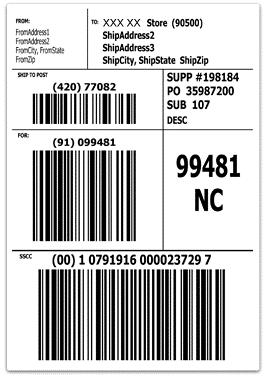
Previously called the UCC-128, the GS1-128 barcode can carry up to 48 characters of information and can include a wide variety of attribute data such as batch/lot information, serial number, expiration date, or country of origin.
Trading partners often request GS1-128 barcodes on higher levels of packaging beyond the item level to give more specificity to the barcode.
The GS1-128 barcode is a subset of the Code 128 symbology, which contains a flagging character, Function Code 1 (FNC1).
Application Identifiers (AIs) indicate what comes next within the barcode, what format the data will be in, if it will be letters, numbers, or special characters, the length of the data, and whether it is fixed or variable length. For example, the AI (01) tells the scanning system, ‘the GTIN is coming next, and it will be 14 digits’.
Application identifiers are both encoded into the barcode and are featured underneath the barcode as numbers in a human-readable format.
Specifically, the GS1-128 barcode can encode multiple pieces of information, including Global Location Numbers (GLNs) for identifying parties and locations, Serialized Shipping Container Code (SSCC) to identify logistic units such as cases, pallets, or shipping containers, and GS1 asset Identifiers.
A single scan of the barcode captures detailed information that supports supply chain efficiency and is a key part of product traceability, helping sellers become better prepared for recalls.
EDI SSCC Labels and Serial Shipping Container Codes

The Serial Shipping Container Code (SSCC) is an 18-digit number used to identify logistics units.
In order to automate the reading process, the SSCC is often encoded in a barcode, generally GS1-128, and can also be encoded in an RFID tag.
The SSCC comprises an extension digit, a GS1 company prefix, a serial reference, and a check digit. It is all numeric and applicable to the tertiary level of packing.
The SSCC is commonly used in the advance ship notice (ASN) EDI transaction.
When using EDI, the SSCC is used in the Advanced Shipping Notice (ASN) transaction.
The SSCC number is 18 digits long, whereas the UCC barcode is a 20-character barcode based on the SSCC with a leading application identifier (00).
UPC and GTIN Identifiers
GTIN stands for Global Trade Item Number, a GS1 identification key used to identify a trade item, which can be a product you sell or service you offer in an online marketplace listing or brick-and-mortar store. It is a globally unique number used to identify your specific product or service.
Global Trade Item Number barcodes have four structures:
- GTIN-8: Always eight digits in length, most often used outside North America and intended to be scanned at POS for small items only
- GTIN-12: 12 digits in length, predominantly used in North America and intended to be scanned at Point of Sale (POS), synonymous with UPC and the only GTIN type that can be encoded in the UPC-A barcode
- GTIN-13: 13 digits in length, predominately used outside North America and intended to be scanned at POS, synonymous with EAN (European Article Number)
- GTIN-14: Always 14 digits in length, never starts with a zero as the first digit, used to identify trade item groupings (e.g., case of a product or set pack) and NOT intended for POS use
GTINs are used in barcodes scanned at retail point of sale and on inner packs, cases, and pallets of products scanned in a distribution or warehouse environment. The GTIN is also used as a key to retrieve predefined information used in EDI (Electronic Data Interchange) and GS1 XML transactions between trading partners (e.g., purchase orders, invoices, advanced ship notices, etc.).
Purchase Order and ASN Reference Numbers
The Advance Shipment Notice (856) is an X12 EDI transaction set that contains order-level information, including purchase order numbers.
The PRF segment contains the purchase order number. Similarly, the REF segment contains the Bill of lading number, PRO number, and Carrier reference number.
These reference numbers link physical labels to electronic transactions, enabling automated matching of shipments with corresponding EDI documents.
Why Standard Formats Matter
Standard formats enable consistent product identification across the supply chain.
GS1 defines trade items as products or services that are priced, ordered, or invoiced at any point in the supply chain.
Minimum case-level traceability is best satisfied by a combination of the GTIN and a batch/lot or serial number. This standardization enables targeted and precise recalls in the event of a food safety issue and will open full end-to-end supply chain visibility for other process improvements, such as inventory management, sustainability, and transparency.
Assessing Your Business Needs for EDI Labels
Before selecting an EDI label solution, you need a clear picture of where your operations stand and what gaps exist in your current processes. This assessment phase determines whether you need basic label automation or a sophisticated multi-partner compliance system.
Evaluate Your Order Volume and Complexity
Start by identifying the key business processes that will benefit from EDI integration, such as order processing, invoicing, and inventory management.
Assess your monthly volume of EDI messages and transactions, as this directly impacts the type of solution you need.
A scalable solution must grow with your business and handle increasing transaction volumes.
If you process hundreds of orders daily across multiple trading partners, you need a system capable of multi-channel integration spanning eCommerce, warehouses, and suppliers
Review Trading Partner Requirements
Each trading partner maintains specific expectations for label formats and data.
Procure mapping guidelines from your trading partners that outline the format in which EDI documents will be sent and received, the trading partner’s preferred communication method, vendor compliance and label requirements.
For instance, Costco requires all shipping cartons to carry GS1-128 barcoded labels that contain the SSCC-18 identifier, creating a direct link between physical cartons and electronic ASN data.
Target direct vendor ship requires branded packing slips using specified font and font color, as well as 16 fields populated with specific values in designated formats.
Full-service providers deal with thousands of rule book changes from retailers each year. Walmart USA made 19 changes in one year, Mills Fleet Farm made 17 changes, and Bed Bath & Beyond made seven changes.
Identify Current Labeling Pain Points
Labeling environments typically suffer from five specific challenges.
High costs arise when difficult user interfaces contribute to high error rates.
Technical issues require world-class support teams to resolve.
Too many label files clutter directories when companies create new labels for each product variant.
Wasted time accumulates when printing wrong labels, discarding them, and printing replacements. Lack of database integration represents one of the most common pain points, leaving too much room for human error and insufficient automation.
Determine Integration Requirements
Assess existing systems and technologies to determine if they can support EDI, which may involve reviewing ERP systems, databases, and network capabilities. Compatibility matters because your solution should work with existing systems and those of your trading partners.
Consider Industry-Specific Compliance Needs
Choose a provider with proven expertise in your sector, whether retail, healthcare, or manufacturing. Different industries have specific EDI standards and compliance requirements. Support for industry-specific document types and workflows, along with a track record of successful EDI implementations, proves your provider understands your operational context.
Key Features to Look for in EDI Label Solutions
Selecting the right EDI label solution requires understanding which technical capabilities directly address your operational requirements. The features you prioritize should align with your trading partner landscape, transaction volumes, and growth trajectory.
Real-Time Label Generation Capabilities
Your solution needs to generate labels instantly as EDI transactions arrive. Real-time alerts for inbound orders trigger immediate label creation, eliminating delays between order receipt and warehouse fulfillment. Intuitive webforms can auto-fill response documents to eliminate manual data entry, while instant generation of shipping labels and compliance documents keeps pace with order processing speeds. Batch processing capabilities allow you to process and print multiple documents and labels at once when handling bulk shipments.
Multi-Partner Compliance Support
Low-code EDI tools break down because each new retailer brings its own multi-retailer compliance transaction sets, validation rules, timing requirements, and label specs. Your solution must accommodate these varying specifications without requiring workflow rebuilds for each partner. Scalable EDI solutions provide extensive support for standards such as EDIFACT, VDA, TRADACOMS, and PEPPOL. This multi-standard support lets you advertise integration credentials to prospective partners and outcompete those that don’t offer rapid integration.
System Integration Options
Integration determines whether your EDI labels function as isolated outputs or connected supply chain data. APIs allow you to integrate EDI with your ERP, creating sophisticated pipelines that modernize supply chain management. Seamless integration with any ERP, WMS, or accounting system through scalable portals ensures data flows without manual transfers. Modern EDI has become flexible, supporting various formats, protocols, and integrations via API.
Automation and Exception Handling
Low-code tools handle the expected path well, but the question becomes what happens when things go wrong. If your workflow doesn’t have defined error-handling logic and someone responsible for acting on it, a failed mapping becomes a compliance problem. Your solution should catch exceptions before they reach your trading partners, preventing chargebacks from validation failures.
Scalability for Business Growth
Scalable EDI software is elastic and flexible, with cloud-based infrastructure and intuitive self-service tools. It allows you to handle higher data volumes, quickly add new trading partners, and adjust to new standards without a major system overhaul. The EDI market itself is projected to reach $4.50 billion by 2030, with cloud EDI accounting for an increasing share of new adoptions.
Cloud vs On-Premise Considerations
Cloud-based servers utilize virtual technology to host applications offsite with no capital expenses. You only pay for the resources you use. Meanwhile, on-premises environments require you to maintain server hardware, power consumption, and space. Cloud computing features nearly instant provisioning because everything is already configured. Commport EDI Solutions with Built in EDI Label Generation Helping Retail, Warehouse and Logistics Operations With Easy Standardized EDI Document and Label Generation provides deployment flexibility that scales with your operations.
Common Challenges and How to Overcome Them
Label Data Mismatches and EDI Errors
EDI errors cost businesses 1-5% of gross invoice amounts in retailer chargebacks. A company shipping $80 million annually may face up to $4 million in deductions. Most failures stem from data synchronization gaps between ERP, warehouse management, and EDI systems rather than transmission issues. Content errors occur when documents contain missing, incorrect, or malformed data, such as wrong item numbers in purchase order acknowledgments or missing GLN identifiers. These errors trace back to stale master data or incomplete onboarding.
Non-Standard Format Across Partners
Each retailer requires different field arrangements, segment qualifiers, and conditional logic within the same transaction set. Walmart, Target, Amazon, and Home Depot each demand unique specifications for standard EDI 850 purchase orders. Mapping failures cluster around trading partner specification updates without notice, new product categories requiring unmapped fields, and regional differences between EDIFACT and X12 standards.
Printer and System Integration Issues
Routing errors occur when message headers contain incorrect sender or receiver identifiers. Connection errors happen at the transport layer between your EDI system and trading partner systems. Each EDI dispute takes roughly 2 hours to resolve, and 5-25% of inbound receiving orders experience preventable issues.
Retailer Compliance Penalties
ASN errors generate the highest chargebacks because mismatches between electronic notifications and physical shipments disrupt receiving. Penalties typically include late or missing ASN at $150 per shipment, incorrect invoice format at $100 per document, and missing PO acknowledgment at $75 per order. A supplier shipping 1,000 orders monthly with a 5% error rate loses $7,500 monthly or $90,000 annually.
Manual Override Problems
Manual processes fail at scale because human error becomes unavoidable. Systems that lack real-time validation notify users of failures days after transmission, when chargebacks are already applied.
Best Practices for Error Prevention
Real-time integration between warehouse operations and EDI transmission removes batch delays that cause ASN mismatches. Automated validation before transmission checks required fields, format compliance, and acceptable value ranges. Proactive connection monitoring identifies transmission failures within seconds rather than hours.
Step-by-Step Implementation Guide
Step 1: Map Your Current Labeling Process
Document every relevant piece of information you send and receive, noting . Examine where order information lives within your system and how data flows through your business operations.exact field names, data types, and lengths
Step 2: Identify Required EDI Transactions
Contact every trading partner’s EDI team to determine which transaction types you need. Common requirements include EDI 850 purchase orders, EDI 856 advance ship notices, and EDI 810 invoices.
Step 3: Choose Your EDI Label Solution
Commport EDI Solutions with Built in EDI Label Generation Helping Retail, Warehouse and Logistics Operations With Easy Standardized EDI Document and Label Generation. Get Started Today! Evaluate providers based on scalability, compatibility with existing systems, total cost of ownership, and support offerings.
Step 4: Integrate with Existing Systems
Work with your EDI provider to implement the solution and map data between your ERP, WMS, and EDI platform. Modern platforms provide pre-built connectors and standardized formats.
Step 5: Configure Label Templates
Construct GS1-128 labels using label formatting tools and populate them with trading partner-specific requirements. Create packing rules for each customer relationship.
Step 6: Test with Trading Partners
Conduct comprehensive end-to-end testing by sending test files and receiving acknowledgments. Trading partners review information to ensure it meets their mapping guide requirements.
Step 7: Train Your Team
Provide training to help staff understand new processes and tools involved. Training reduces errors and enhances operational efficiency.
Step 8: Monitor and Optimize Performance
Implement real-time monitoring with automated alerts to detect transaction failures and processing delays. Track key performance indicators like transaction throughput and error rates.
Conclusion
You now have everything needed to transform your labeling operations from manual processes to automated EDI-driven workflows. In light of the compliance penalties, shipping delays, and inventory mismatches that manual labeling creates, EDI label automation isn’t optional anymore for businesses scaling their operations.
The standards, integration steps, and best practices we covered will help you eliminate transcription errors and meet trading partner requirements consistently. Commport EDI Solutions with Built in EDI Label Generation Helping Retail, Warehouse and Logistics Operations With Easy Standardized EDI Document and Label Generation. Get Started Today!
Overall, your supply chain efficiency depends on accurate, automated label generation that keeps pace with transaction volumes and maintains compliance across all partners.
Commport EDI Solutions With Built in EDI Shipping Label Generation
Generate GS1 128 Shipping Labels on the Go with Commport Cloud EDI Solutions.
Easy Integration With Any Trading Partner!
Frequently Asked Questions
When choosing an EDI label solution, prioritize providers that offer robust customer support including onboarding assistance, troubleshooting, and ongoing technical help. Look for solutions that integrate seamlessly with your existing ERP or WMS systems, support multiple EDI standards (like ANSI X12 and EDIFACT), and can scale with your business growth. Consider whether cloud-based or on-premise deployment better fits your operations, and ensure the provider has experience with your specific industry’s compliance requirements.
A complete EDI system for label generation consists of four core components: an EDI translator that converts business documents into standardized formats, mapping tools that align your data with trading partner specifications, a secure network for transmitting EDI transactions, and technical support services. For optimal automation, your system should also integrate tightly with internal systems like ERP or warehouse management software to enable real-time label generation without manual data entry.
Businesses can choose from several EDI implementation approaches depending on their size and transaction volume. Options include direct EDI (point-to-point connections), EDI via VAN (Value-Added Network) or network services providers, EDI via AS2 protocol, FTP/SFTP-based EDI, web EDI for browser-based transactions, mobile EDI solutions, EDI outsourcing services, and dedicated EDI software. Many larger companies use hybrid solutions that combine multiple methods to accommodate different trading partners based on transaction frequency and importance.
EDI labels eliminate transcription errors by automatically generating labels directly from electronic transaction data rather than requiring manual data entry. When your system receives an EDI purchase order, it creates corresponding labels with exact specifications without human intervention. This automation ensures that label information perfectly matches your electronic records since both come from the same data source, significantly reducing shipping delays and compliance penalties that result from manual labeling mistakes.
EDI shipping labels contain comprehensive information beyond basic carrier details. They include GS1-128 barcodes with application identifiers, Serial Shipping Container Codes (SSCC) for logistics unit identification, GTIN product identifiers, purchase order reference numbers, batch or lot numbers, shipment tracking details, and packaging hierarchy information showing which items are in specific cartons and which cartons are on each pallet. This standardized data enables automated scanning and processing throughout the supply chain.