



Introduction to Microsoft Dynamics 365 EDI Integration
Microsoft Dynamics 365 lacks native EDI capabilities, creating a significant challenge for businesses that rely on automated partner trading cycles.
Consequently, organizations must choose between in-house integration solutions or external managed services to bridge this architectural gap.
These limitations affect core transaction cycles, particularly order-to-cash and procure-to-pay processes, resulting in slower operations, limited visibility, and higher costs.
In this blog, we’ll explore how Microsoft Dynamics 365 EDI integration works, the technical approaches available for implementing Microsoft EDI solutions, and how proper Dynamics 365 EDI setup can eliminate manual data entry while optimizing your supply chain operations.
We’ll also examine integration options ranging from middleware platforms to EDI Azure solutions and managed service providers.
Key Takeaways
- Dynamics 365 needs external EDI solutions – The platform doesn’t support EDI natively, requiring middleware, managed services, or AppSource add-ons for automated document exchange.
- Four integration approaches available – Choose between in-house middleware platforms, managed EDI services, embedded AppSource solutions, or centralized EDI platforms based on resources and expertise.
- API and file-based integration methods – Technical implementation uses REST/OData APIs for real-time processing or file-based exchange via SFTP/AS2 for batch operations.
- Dramatic efficiency gains possible – EDI automation reduces manual data entry by 98% and cuts processing errors by over 70% while accelerating order-to-cash cycles.
- Partner onboarding requires significant planning – Each trading partner integration can consume 210 hours for mapping, testing, and configuration before going live.
Understanding EDI for Business Document Exchange
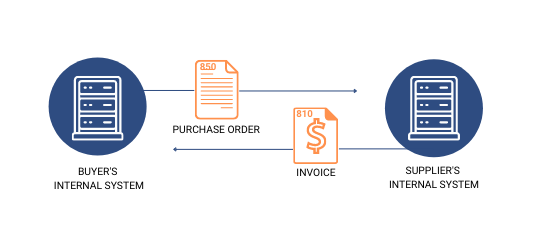
Electronic Data Interchange refers to the computer-to-computer exchange of business documents in standardized electronic formats between organizations.
This automated process eliminates manual delivery of paper documents, enabling information to move directly from one application to another without human intervention.
EDI standards define the exact location and order of information in each document, allowing systems to interpret data consistently.
Organizations exchange various document types through EDI, including
- Purchase orders (850),
- Invoices (810),
- Advance ship notices (856),
- Inventory reports (846), and
- Shipping status updates (214).
For instance, when a supplier receives an EDI 850 purchase order, the system automatically processes it without manual data entry, creates the necessary transactions, and generates acknowledgments.
This direct system-to-system communication eliminates the tedious labor of manual spreadsheet reviews and reduces email exchanges.
Why Dynamics 365 Lacks Native EDI Support
Out of the box, Microsoft Dynamics 365 does not include EDI support.
Companies must rely on external EDI or order management systems to translate documents, validate partner requirements, and create ERP transactions.
This architectural design keeps the ERP focused on core business processes while dedicated systems handle EDI complexities.
The external integration layer performs several responsibilities.
It translates X12 or EDIFACT documents into formats Dynamics 365 can process, validates trading partner requirements, maps EDI data to ERP fields, manages acknowledgments and compliance workflows, and monitors transactions while handling exceptions.
Accordingly, most teams implement a status-based push model where only validated, approved orders enter the ERP. This approach prevents partial or noncompliant orders from becoming operational problems and maintains system stability.
Key EDI Standards: X12 and EDIFACT
Two primary standards govern EDI transactions globally. , serves as the preferred EDI standard in North America, X12, created by the Accredited Standards Committee in 1979. It uses three-digit codes to identify documents.
EDIFACT, developed by the United Nations Economic Commission for Europe in 1986, applies throughout Europe and Asia. This standard uses six-letter codes for document identification.
While both standards enable the same functionality, they differ in structure and regional adoption.
North American brands developing relationships with European trading partners often use both X12 for domestic markets and EDIFACT for international efforts.
Integration Approaches for Dynamics 365 EDI
Organizations implementing dynamics 365 edi integration face four primary architectural choices, each with distinct operational implications and resource requirements.
- In-House EDI Integration Using Middleware Platforms
- Managed EDI Service Providers and VAN Solutions
- Embedded EDI Add-ons via Microsoft AppSource
- Centralized EDI Platform Integration
1. In-House EDI Integration Using Middleware Platforms
Middleware platforms enable businesses to manage EDI translation, mapping, and connectivity internally without external dependencies.
Solutions like Commport EDI translation provide connectors for transmission and XML editors to manipulate files, supporting formats such as X12 or DIFACT, and communicate via VAN, AS2, and sFTP.
Commport built in EDI translation engine uses a metadata-driven approach that eliminates heavy replication of logic and reduces implementation costs.
However, in-house implementation demands significant EDI knowledge and internal resources.
Testing requirements prove substantial, as teams must validate all business case variations before going live.
Besides technical complexity, internal teams must balance existing responsibilities with integration tasks, resulting in elongated implementation periods compared to experienced external providers.
2. Managed EDI Service Providers and VAN Solutions
Managed services handle the entire EDI process, including document exchange, integration, and troubleshooting through cloud-based or outsourced models.
Commport EDI platform connects businesses to thousands of retailers, vendors, and distributors through a single integration point, eliminating the need for unique connections with every partner.
VAN providers like Commport VAN enable connections with over thousands of pre-connected trading partners worldwide.
These networks reduce entry points, fortify data security, and provide comprehensive transaction visibility.
Accordingly, 93% of organizations report a clear need to optimize their current EDI VAN implementation.
3. Embedded EDI Add-ons via Microsoft AppSource
AppSource-certified modules integrate directly within Dynamics 365 environments.
Commports EDI Integration automates purchase orders, invoices, and shipping notices, allowing users to activate specific customers and schedule exports hourly, daily, or weekly.
The solution converts source formats to destination formats and supports transmission via VANS, AS2, SFTP, and FTP
4. Centralized EDI Platform Integration
Centralized platforms like Commport Integrated EDI Solution provide a profile-based architecture that decouples partner configuration from core flows, enabling reusable mapping templates and partner-specific validation rules.
This approach shifts IT from maintaining vendor relationships to defining reusable integration patterns.
Commport EDI Solutions integrates with all major ERP providers such as SAP, NetSuite, Microsoft 365, Sage, Acumatica, Zoho, and more.
Get started with your EDI ERP implementation today!
Technical Requirements for EDI Implementation
Successful microsoft dynamics 365 edi integration requires four technical components that work together to enable automated document exchange between Dynamics 365 and trading partners.
1. API-Based Integration with Dynamics 365
It provides access to business objects such as orders, invoices, and customer data within Dynamics 365 REST and OData APIs.
The integration platform translates EDI messages into JSON format and transmits them to the system using the Common Data Service (CDS) API .
For instance, when processing inbound purchase orders, the platform receives EDI messages in X12 850 or EDIFACT ORDERS format via SFTP, converts them to Dynamics 365’s native JSON format, and passes them through the CDS API.
Business users then create invoices in Dynamics 365, triggering integration flows that communicate invoice data in JSON format back to the platform.
2. File-Based Data Exchange Methods
File-based integration exchanges data through structured files following X12, EDIFACT, XML, or CSV formats.
Transmission occurs via FTP/SFTP, AS2, VAN, or HTTPS protocols. The workflow involves data extraction from Dynamics 365, file formatting according to EDI standards, transmission to trading partners, and acknowledgment processing.
While this approach handles large transaction volumes efficiently, it operates in scheduled batches rather than in real-time.
3. Partner Onboarding and Mapping Configuration
Partner onboarding can consume 210 hours per partner, involving contact information gathering, mapping guideline procurement, and testing phases.
EDI mapping translates internal data formats into partner-required EDI standards.
Organizations must configure incoming and outgoing mailbox paths, trading partner types, partner IDs, and branch identifiers.
Testing validates data accuracy and compatibility before deployment.
4. Real-Time Monitoring and Exception Handling
Modern EDI platforms provide live tracking across all message types, protocols, and partners.
Real-time alerts trigger when disruptions occur, while detailed error insights accelerate resolution.
Teams access message statuses, validation results, and delivery updates directly within Dynamics 365 interfaces.
Business Process Automation With EDI
EDI automation within Microsoft Dynamics 365 EDI integration transforms core business cycles by eliminating manual intervention across order-to-cash and procure-to-pay workflows.
1. Order-to-Cash Cycle Automation (850, 810, 856 Documents)
The O2C cycle automates document flows through EDI 850 purchase orders, EDI 855 acknowledgments, EDI 856 advance ship notices, and EDI 810 invoices.
Dynamics 365 receives orders directly into the ERP, validates credit and inventory availability instantly, and coordinates with suppliers through electronic shipping notices.
This automation accelerates response times, improves customer satisfaction, and shortens time to revenue.
2. Procure-to-Pay Process Optimization
EDI-automated P2P cycles reduce processing time from 7-10 days to 1-3 days.
The system queries ERP automatically to identify stock needing replenishment, creates purchase orders, and receives supplier acknowledgments without human intervention.
Real-time visibility in each P2P stage enables better management and decision-making based on accurate data.
3. Supply Chain Visibility and Partner Collaboration
Real-time data exchange through Microsoft EDI provides immediate updates about inventory levels, shipping schedules, and payment status.
Modern EDI enables continuous data exchange between systems, transmitting information to trading partners instantly.
Commport EDI Solutions integrates with all major ERP providers such as SAP, NetSuite, Microsoft 365, Sage, Acumatica, Zoho, and more.
4. Reducing Manual Data Entry and Processing Errors
EDI eliminates manual data entry, reducing error rates by over 70%. Companies can cut manual order entry by 98% with modern EDI solutions, freeing employees from tedious tasks to focus on value-added activities.
Conclusion
All things considered, Microsoft Dynamics 365 EDI integration addresses the platform’s native EDI gap through four distinct approaches: middleware platforms, managed services, AppSource add-ons, and centralized integration systems.
Your choice depends primarily on internal resources, technical expertise, and partner volume. EDI automation transforms order-to-cash and procure-to-pay cycles, reducing manual entry by 98% and cutting processing errors by 70%.
We’ve explored technical requirements, implementation strategies, and business benefits to help you select the optimal solution for automated partner trading.
Commport EDI Microsoft Dynamics 365 Integration Services
Need Help? Download: Commport's EDI Buyers Guide
Unlock the full potential of your supply chain with our comprehensive EDI Buyer's Guide — your first step towards seamless, efficient, and error-free transactions
Frequently Asked Questions
No, Dynamics 365 does not include native EDI support. Organizations must use external EDI systems or integration platforms to translate documents, validate trading partner requirements, and create ERP transactions. This design keeps the ERP focused on core business processes while dedicated systems handle EDI complexities.
There are four primary approaches: in-house integration using middleware platforms, managed EDI service providers and VAN solutions, embedded EDI add-ons available through Microsoft AppSource, and centralized EDI platform integration. Each option varies in terms of resource requirements, technical complexity, and operational control.
The two main EDI standards are X12 and EDIFACT. X12, created in 1979, is predominantly used in North America and uses three-digit codes to identify documents. EDIFACT, developed in 1986 by the United Nations, is widely adopted throughout Europe and Asia and uses six-letter codes for document identification.
EDI automation streamlines order-to-cash and procure-to-pay cycles by eliminating manual data entry and reducing processing errors by over 70%. It accelerates order processing, provides real-time visibility into inventory and shipping, and can reduce manual order entry by 98%, allowing employees to focus on higher-value activities.
Successful implementation requires four key components: API-based integration using REST and OData APIs to access business objects, file-based data exchange methods for structured document transmission, partner onboarding and mapping configuration to translate data formats, and real-time monitoring with exception handling to track messages and resolve issues quickly.