


Introduction
Payment reconciliation shouldn’t feel like solving a puzzle every month.
Yet accounting teams spend countless hours manually matching invoices to payments, hunting through emails for remittance details, and fixing mismatches that slow down cash flow.
In reality, companies processing hundreds or thousands of invoices each month face significant administrative burdens with manual reconciliation.
Spreadsheet tracking, email communications, and manual accounting entries create bottlenecks that delay financial visibility and increase errors.
There’s a better way.
Automated payment reconciliation using EDI 810 (electronic invoices) and EDI 820 (payment remittance advice) eliminates manual work by automatically matching payments to invoices.
This creates a closed-loop system from invoice generation to cash application.
In this blog, we’ll show you exactly how to fix your payment reconciliation issues using EDI automation.
Key Takeaways
- Automate invoice-to-payment matching using EDI 810 (electronic invoices) and EDI 820 (payment remittance) to eliminate manual data entry errors that affect 60% of invoices.
- Integrate EDI with your ERP system to create real-time visibility between invoices and payments, reducing the average 10-day invoice processing time significantly.
- Configure automated reconciliation rules to handle payment discrepancies and exceptions without manual intervention, cutting the $88,660 annual cost of manual cash application.
- Start with system assessment before choosing an EDI provider – evaluate your current reconciliation process, standardize trading partner requirements, and test thoroughly for successful implementation.
- Monitor key performance metrics like processing time, error rates, and payment delays to continuously optimize your automated workflow and maintain sustained ROI.
What Are EDI 810 Invoice and EDI 820 Payment Remittance Advice Documents?
Understanding what EDI payments are forms the foundation for fixing reconciliation issues.
EDI 810 and EDI 820 serve as the digital backbone of automated invoice-to-payment workflows.
EDI 810: The Electronic Invoice
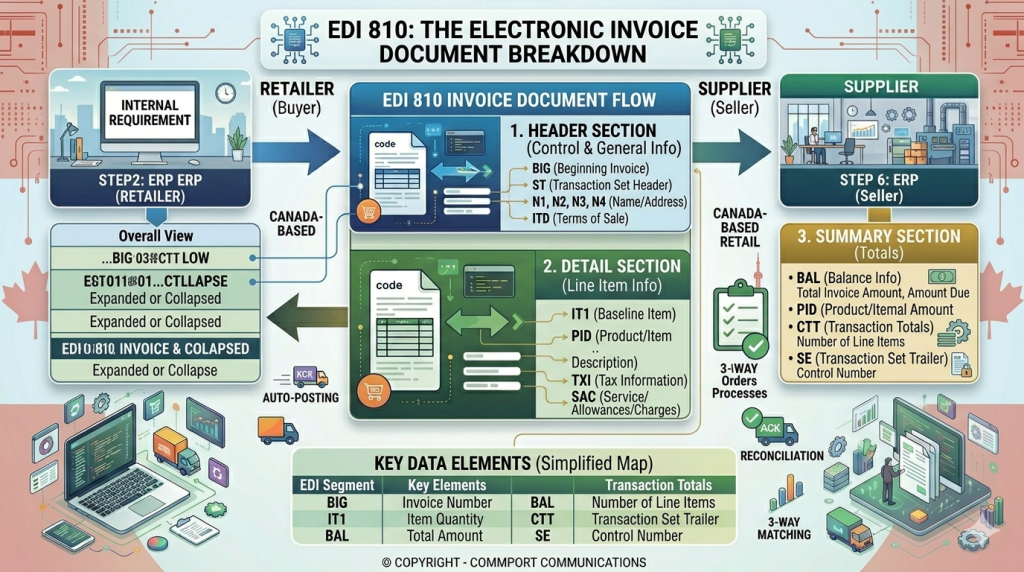
An EDI 810 Invoice is a document that indicates charges due between a seller and buyer.
It replaces paper, email, or PDF-based invoices with a structured digital format that computer systems can read and process automatically.
Sellers send EDI 810 documents to buyers once orders have shipped.
The invoice includes the date and invoice number, buyer and seller details, order information with item quantities and costs, any additional fees or allowances, the total amount due, payment methods, payment terms, and tax information.
The EDI 810 follows specific segment structures.
- The BIG segment contains the starting point with the date and purchase order number.
- IT1 segments repeat for each item identification.
- TDS shows the total amount due, and
- CAD provides carrier details.
EDI 820: Payment Order and Remittance Advice
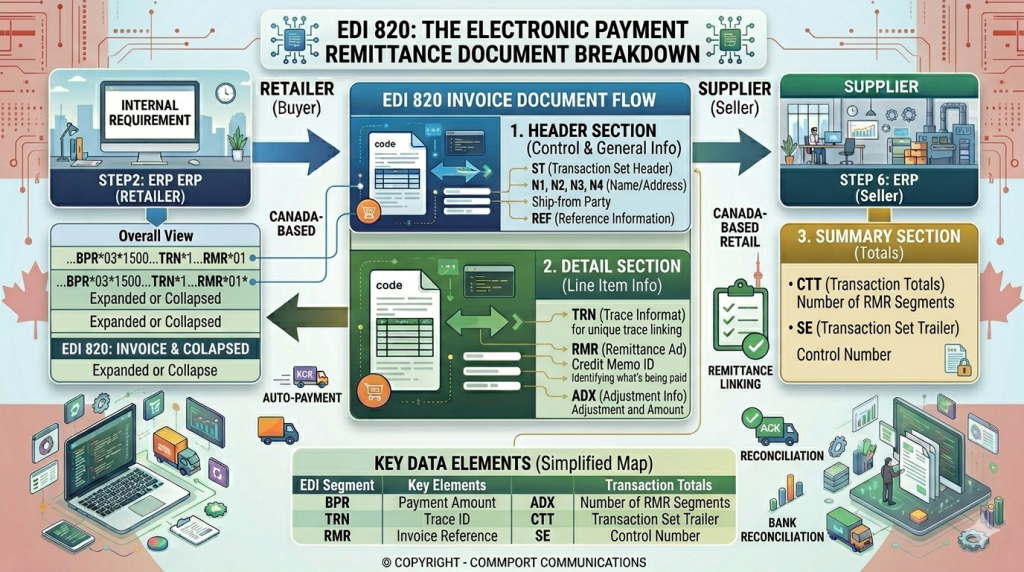
An EDI 820 is an electronic data interchange message and remittance advice between trading partners.
Remittance advice accompanies a payment to inform vendors of the payment made and provide additional transaction details.
The EDI 820 typically includes payment amount, invoice numbers or reference numbers, payment date, payment method, and other relevant data.
This document ensures payments are accurately credited to the proper account and outstanding balances are resolved.
EDI 820 documents act as a statement of intent to pay. They can also advise sellers of adjustments to payment amounts.
While triggered by receipt of an EDI 810 invoice, buyers can send EDI 820 when they receive invoices in any format.
Common Payment Reconciliation Issues (And Why They Happen)
Most reconciliation problems stem from systemic issues rather than isolated mistakes.
Finance teams processing payments manually face recurring challenges that compound over time.
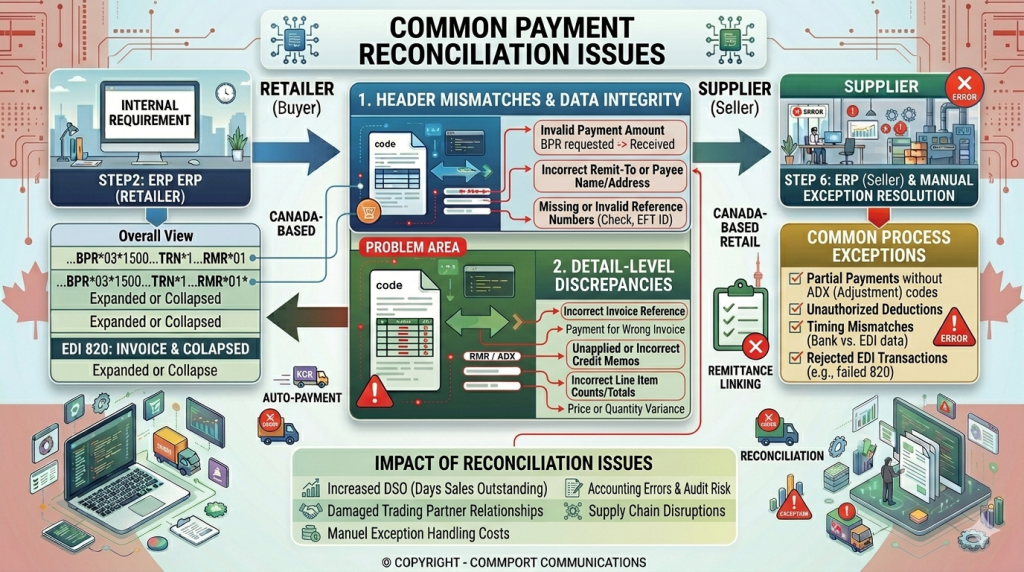
1. Manual Data Entry Errors and Invoice Mismatches
These are caused by manual data entry. Relying on spreadsheets and manual reconciliation increases the risk of mistakes.
Even small errors in matching invoices to payments can delay the financial close and create reporting inaccuracies.
Over 60% of invoice errors are typos, transposed purchase order numbers, and missed decimal points during manual processing, creating discrepancies that ripple through payment systems.
Organizations processing hundreds or thousands of payments daily face reconciliation challenges where manual tracking becomes inefficient, increasing the likelihood of unmatched or misposted transactions.
In our recent case study, we found out that on average, a manual invoice takes 10 days to process, and manual cash application processes cost organizations an average of $88,660 annually.
2. Lack of Visibility Between Invoices and Payments
Payment data spread across multiple ERPs, banks, and payment gateways slows down reconciliation.
Lack of centralized information hinders accuracy and reduces cash flow visibility.
Without real-time payment insights, businesses struggle to track when expenses are due or when accounts receivable payments will be credited.
Fragmented systems create data silos that hinder traceability and prevent data comparison between teams.
Finance teams often struggle to get real-time insights into payments and cash positions, making it harder to manage liquidity and plan working capital.
3. Slow Cash Application and High DSO
Manual cash application is labor-intensive.
Organizations spend 16 hours daily posting cash manually.
Accounts receivable teams executing clerical work create a time sink that detracts from value-added work.
High invoice volumes cripple companies and distort the cash flow picture since accounts receivable teams cannot apply cash soon enough.
A hypothetical organization spends almost $90,000 annually on interest caused by inaccurate and delayed cash posting.
These interest costs occur due to lengthy DSO times, creating working capital holes.
4. Frequent Payment Disputes and Adjustments
Customers may make payments in installments or at unexpected times.
Resolving these exceptions manually consumes time and affects the overall accuracy of the reconciliation process.
Growing companies also attract sophisticated customers with complex payment needs who can make one payment to cover multiple invoices or raise disputes at the line item level.
Frequent payment incidents that impact customers lead to poor reviews and reputational damage.
Errors in payment records strain relationships with vendors and customers, as missing payments or incorrect charges erode trust.
How to Fix Payment Reconciliation with EDI 810 and 820: Step-by-Step Process
Fixing payment reconciliation requires a structured implementation approach.
Following these six steps will transform your manual processes into automated workflows using EDI 810 and EDI 820.
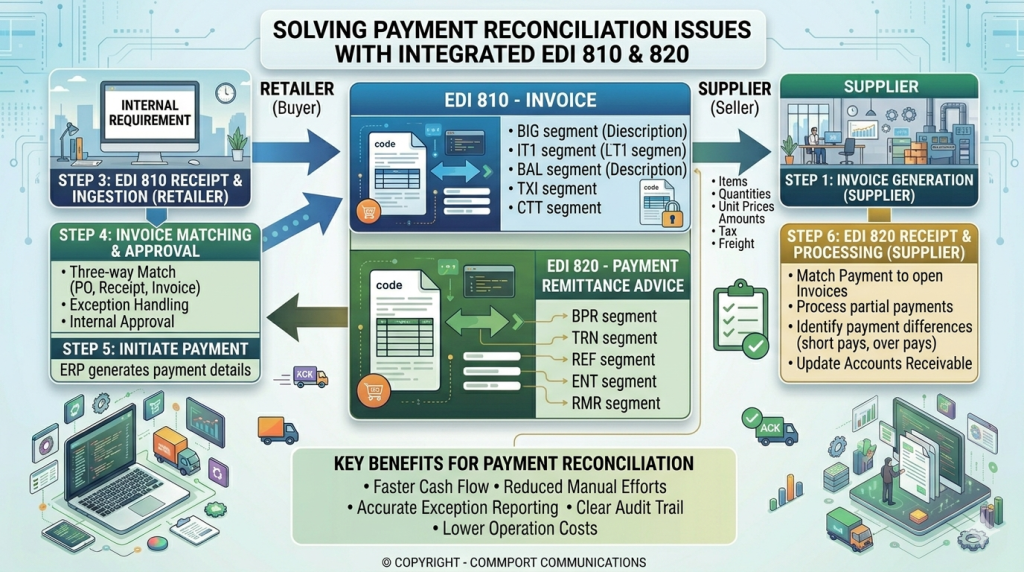
Step 1: Automate Invoice Generation with EDI 810
Configure your ERP system to automatically generate invoices in EDI 810 format once orders are shipped.
The system pulls line-item details and payment terms directly from purchase order and shipment confirmation data.
The EDI 810 is then translated into the appropriate syntax (ANSI X12 or EDIFACT) and securely transmitted to buyers via AS2, SFTP, or a Value-Added Network.
Step 2: Enable Electronic Payment Processing with EDI 820
Implement EDI 820 to automate payment order and remittance advice exchange.
After receiving invoices, buyers process payments electronically and send EDI 820 documents containing payment details, invoice numbers, amounts, and any adjustments.
This eliminates manual remittance posting and provides advance notification of incoming payments.
Step 3: Set Up Real-Time Invoice-to-Payment Matching
Configure your system to automatically validate EDI 810 invoices against EDI 850 purchase orders and EDI 856 shipment notices.
When buyers receive invoices, the system checks quantities, prices, and delivery details.
Matching invoices get approved for payment while discrepancies trigger alerts for review. Real-time invoice matching prevents payment delays and catches errors immediately.
Step 4: Integrate EDI with Your ERP and Accounting Systems
EDI-ERP integration enables automatic data translation and transfer between systems, eliminating manual rekeying and accelerating processing times.
Choose from several integration methods: native connectors built for popular ERP systems, middleware solutions like iPaaS platforms, custom API-based integration, or managed EDI services.
Leading EDI providers integrate directly with ERP systems such as Acumatica, Oracle NetSuite, or Microsoft D365, ensuring invoice data automatically updates ledgers, inventory, and customer accounts.
Step 5: Configure Automated Reconciliation Rules
Set up reconciliation rules within your system to handle different transaction types and matching scenarios.
Define rules for handling discrepancies, such as mismatched quantities or prices, automatically.
This ensures exceptions don’t hold up entire payment cycles. Automated reconciliation rules process matched transactions without manual intervention.
Step 6: Monitor and Optimize Your EDI Workflow
Use dashboards and analytics to monitor invoice performance metrics, including processing time, error rates, and payment delays.
Track key indicators to identify bottlenecks in your automated payment reconciliation system. Continuous improvement ensures automation delivers sustained ROI.
Regular monitoring helps maintain accurate financial records and strengthens security compared to traditional methods.
Implementing EDI Payment Reconciliation Successfully
Success with EDI payment reconciliation depends on careful planning and execution. These four steps ensure smooth implementation.
1. Assess Your Current Payment Reconciliation System
Start by evaluating whether a cloud-based EDI, iPaaS based EDI solution, or on-premises translator best fits your scale, skills, and risk profile.
Prioritize robust mapping tools, built-in validations, and monitoring that streamline EDI system integration with ERP, WMS, TMS, and billing platforms.
Look for features that reduce time to value: prebuilt partner kits, reusable maps, a sandbox for certification, and alerting for failed acknowledgments.
2. Choose the Right EDI Solution Provider
Select an EDI provider offering standards and format support for ANSI X12, EDIFACT, and Tradacoms.
The solution should hyperautomate and digitalize processes such as order processing, eliminating manual data entry.
Dashboards and reporting tools providing insights into transaction status and trading partner performance empower both business and technical users.
3. Standardize Trading Partner Requirements
Collect each partner’s EDI implementation guides and onboarding checklists defining required transaction sets, versions, communication protocols, and business rules.
Document identifiers and routing details early: interchange IDs, qualifiers, DUNS/GLN, mailboxes, and contact paths.
4. Test and Validate Your EDI Setup
Create a formal test plan mapping partner requirements to test cases. Include unit testing, integration testing, compliance testing, and certification testing.
Validate cross-document consistency between purchase orders, ship notices, and invoices.
Bonus Topics
EDI 812
EDI 812 is the Credit/Debit Adjustment transaction set, used to communicate an increase or decrease in charges for goods or services. It is often described as the electronic equivalent of a credit memo or debit memo, and it may be used by either the seller or buyer depending on the trading partner arrangement. The document can reference a prior purchase order, invoice, shipment, or return authorization, which helps connect the adjustment back to the original business event. Common reasons include pricing errors, returns, allowances, shortages, damaged goods, or additional fees. It is used to record and track accounting changes, but it is not itself a funds transfer transaction.
EDI 824
EDI 824 is the Application Advice transaction set, used to notify a sender about the status or outcome of a previously received transaction. It is commonly used to report acceptance, rejection, or other processing issues when a document does not fully meet business rules or system expectations. In practical terms, it acts as an exception-reporting message rather than a response to the business content of the original document. In some industries, especially healthcare, it is also used to report problems outside standard acknowledgment sets such as the 999 or 997. After receiving it, the recipient may still send a functional acknowledgment like a 997 to confirm receipt of the 824 itself.
EDI 828
EDI 828 is the Debit Authorization transaction set, used to send debit authorization information from a paying entity to a financial institution. It lets the payer authorize, add, or cancel debits that may be matched against incoming ACH or paper-based debits. The purpose is to help the financial institution verify whether a debit is authorized before it is processed. This transaction is useful for controlling recurring or one-time debit activity and reducing unauthorized withdrawals. Commport’s description also emphasizes that it supports secure communication of both electronic and paper-based debit authorizations.
EDI 829
EDI 829 is part of the finance/payment family of EDI transactions and is not the same as an invoice, remittance, or debit authorization document. It specifically addresses cancellation, not payment initiation or advice. It lets a payer request that a scheduled or pending payment be stopped or canceled before processing is completed. It is commonly used for postdated or pending payments where there is still time to intervene before settlement. In practical terms, it functions like an electronic stop-payment instruction within an EDI payment workflow.
Conclusion
Payment reconciliation doesn’t have to drain your team’s time and energy.
EDI 810 and 820 automation eliminates manual matching, reduces errors, and accelerates your cash flow significantly.
We’ve walked you through the complete implementation process, from invoice generation to automated reconciliation.
The key is taking that first step. Assess your current system, choose the right EDI provider, and start building your automated invoice-to-cash workflow.
Your finance team will thank you, and notably, your bottom line will reflect the difference.
Commport EDI Solutions - #1 EDI Solutions in North America
Need Help? Download: Commport's EDI Buyers Guide
Unlock the full potential of your supply chain with our comprehensive EDI Buyer's Guide — your first step towards seamless, efficient, and error-free transactions
Frequently Asked Questions
EDI 820 is typically an outbound transaction sent from the buyer to the seller. After processing payment transactions in your Accounts Payable system, you send the EDI 820 transmission directly to your trading partner or bank to communicate payment details and remittance advice.
What is the purpose of the EDI 820 payment order?
Common EDI errors include message content issues (missing or incorrect data), sequence problems, connection failures, routing errors, and configuration mistakes. Most message content errors can be prevented by maintaining accurate master data and implementing proper validation during the trading partner onboarding process.
EDI 810 and EDI 820 create a complete payment cycle. The seller sends an EDI 810 invoice after shipping goods, the buyer validates and processes it, then sends an EDI 820 payment order with remittance details. This automated exchange eliminates manual matching and creates a closed-loop system from invoice to payment.
Automated payment reconciliation using EDI eliminates manual data entry errors, provides real-time visibility between invoices and payments, speeds up cash application, and reduces payment disputes. Organizations can save significant time and costs while improving accuracy and accelerating their cash flow.