



Introduction
EDI 832 defines the item, EDI 846 shows the inventory, and EDI 947 corrects the inventory
Together, EDI 832, 846, and 947 create a cleaner inventory-management loop.
The 832 establishes the item master and pricing context,
The 846 shares livestock visibility, and
The 947 corrects the record when physical inventory changes.
This combination helps partners keep product data, available stock, and book inventory synchronized across systems.
A simple workflow looks like this:
- The supplier sends EDI 832 to define the catalog and pricing for items.
- The warehouse or supplier sends EDI 846 to show current inventory availability.
- If a cycle count, damage event, or discrepancy occurs, the warehouse sends EDI 947 to adjust inventory records.
- The recipient updates ERP or WMS data so future 846 messages reflect the corrected inventory position.
This is especially useful in retail, distribution, and 3PL environments where product data, stock visibility, and physical adjustments must stay tightly aligned.
Key Takeaways
- EDI 832 automates product catalog management – Replace manual catalog updates with electronic price and product information sharing, eliminating errors and saving time.
- EDI 846 provides real-time inventory visibility – Share current stock levels, availability, and replenishment data instantly between trading partners to reduce stockouts and overstocking.
- EDI 947 is the warehouse-side transaction that reports inventory adjustments, gains, losses, damage, shrinkage, reclassification, or cycle-count variances, so the depositor or trading partner can keep book inventory aligned with physical stock
- Integration eliminates manual data entry errors – Connecting EDI with ERP and warehouse systems creates automated workflows that reduce human error and improve data accuracy.
- Daily inventory updates are often required – High-volume retailers may need multiple EDI 846 transmissions per day to maintain accurate eCommerce listings and ordering decisions.
- Measure success through clear KPIs – Track on-time delivery rates, inventory turnover, and end-to-end visibility to evaluate EDI implementation effectiveness.
What is EDI Inventory Management?
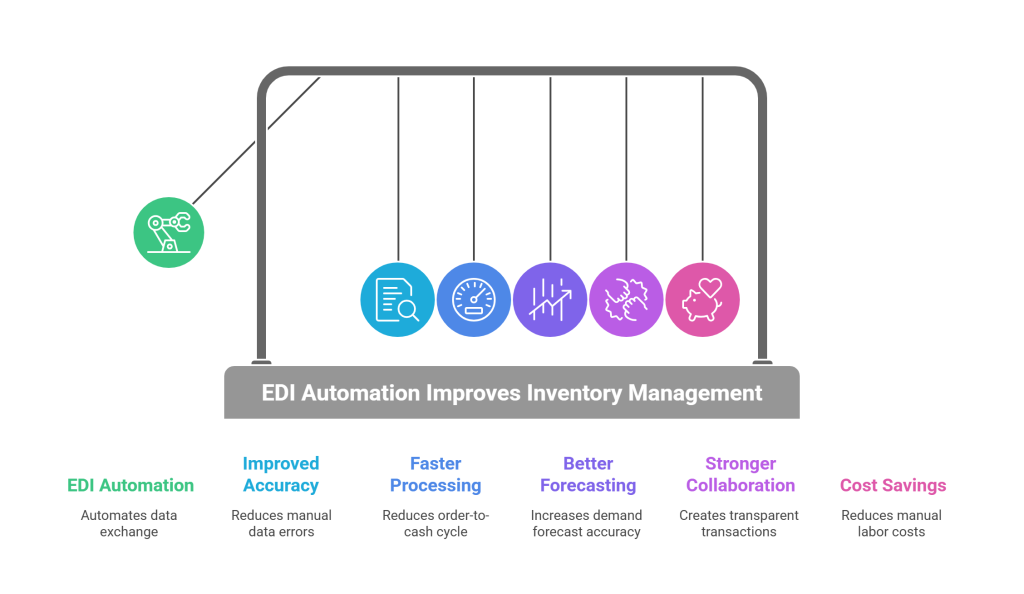
EDI in inventory management refers to the automated exchange of inventory data between trading partners using standardized electronic messages, without manual entry or intervention.
This means inventory positions are communicated system-to-system in a standardized, structured format that both sides can trust.
When inventory changes inside one system, EDI transactions communicate those changes outward in near real time.
An EDI system acts as the bridge between external trading partners and internal systems like ERP, WMS, or production planning tools.
When supported by the right EDI software, this approach enforces validation, monitors exceptions, and ties inventory visibility directly into ordering, shipping, and production workflows.
How EDI Streamlines Inventory Processes
First, EDI minimizes errors caused by manual data entry by passing information electronically, making data more reliable. EDI data is also more accessible to verify and validate than non-standardized files and documents. When EDI logistics data is exchanged electronically or near real-time, any changes are immediately visible to all parties.
Second, real-time inventory updates help maintain accurate stock levels, which reduces the risk of overstocking or shortages. Without EDI, warehouse managers often rely on spreadsheets and manually generated reports to track inventory and shipments, but those aren’t always current.
Third, EDI provides a constant, up-to-date look at inventory levels, pending orders, and supplier deliveries, so managers are able to anticipate demand and avoid stockouts.
Key EDI Transaction Sets for Inventory Control
Several EDI inventory transaction sets support warehouse and inventory operations.
The 846 EDI document communicates current stock positions and availability, reflecting on-hand quantities, committed inventory, items in transit, and projected availability.
When a warehouse or 3PL facility receives a shipment, it sends an EDI 944 to confirm delivery.
EDI 947 provides detailed information about adjustments made to warehouse inventory, including items adjusted, reasons for adjustment, and quantities added or removed.
Understanding EDI 832: Price and Sales Catalog
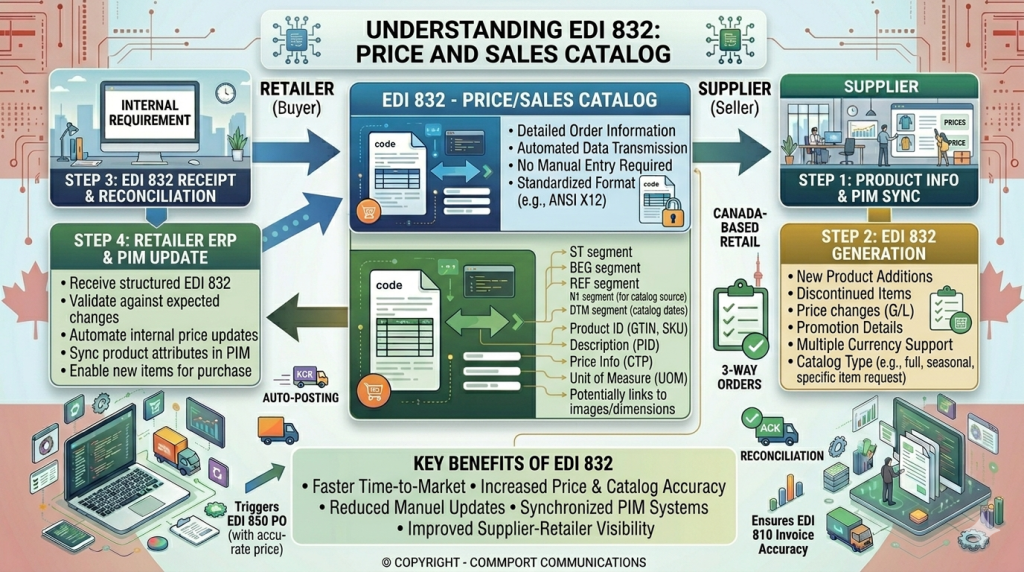
What is EDI 832 and Its Purpose
This transaction follows the X12 format established by the American National Standards Institute.
Suppliers and manufacturers use EDI 832, known as the Price/Sales Catalog transaction set, to share up-to-date product and pricing details with trading partners.
Unlike the 846 edi document that tracks inventory positions, EDI 832 replaces paper catalogs entirely.
Organizations typically send EDI 832 on a predetermined schedule, often quarterly, though some transmit it more frequently.
Price changes can also trigger immediate catalog updates. This approach ensures retailers, distributors, and dealers maintain current information without waiting for scheduled releases.
EDI 832 Document Components
The document structure includes catalog number and transmission date, seller identification and contact details, product identifiers such as SKUs or UPCs, item descriptions with physical specifications, per unit pricing information, minimum order quantities, and available promotions. Additional elements cover terms of sale, discounts, and packaging details.
How EDI 832 Supports Product Information Sharing
Recipients integrate EDI 832 data directly into their business software, using information like minimum order quantities and case-pack quantities during the ordering process.
This integration creates a more accurate view of products during purchasing. Automation eliminates time-consuming manual catalog updates and reduces errors that damage partner relationships.
Security features, including HTTPS protocol encryption and user authentication, protect sensitive business details such as exclusive discounts.
Limitations of EDI 832 for Modern Buyers
The EDI 832 requires a strict data hierarchy between selection code, product code, and catalog that may not align with how suppliers categorize products.
This mismatch creates additional work, forcing suppliers to artificially modify their data to match prescribed structures. Additionally, the transaction accommodates only a limited set of data attributes.
When retailers require extended information such as item dimensions, image data, or detailed pricing specifications, suppliers must supplement the EDI 832 with spreadsheets or use the GDSN datapool solution to support other product attributes.
Understanding EDI 846: Inventory Inquiry and Advice
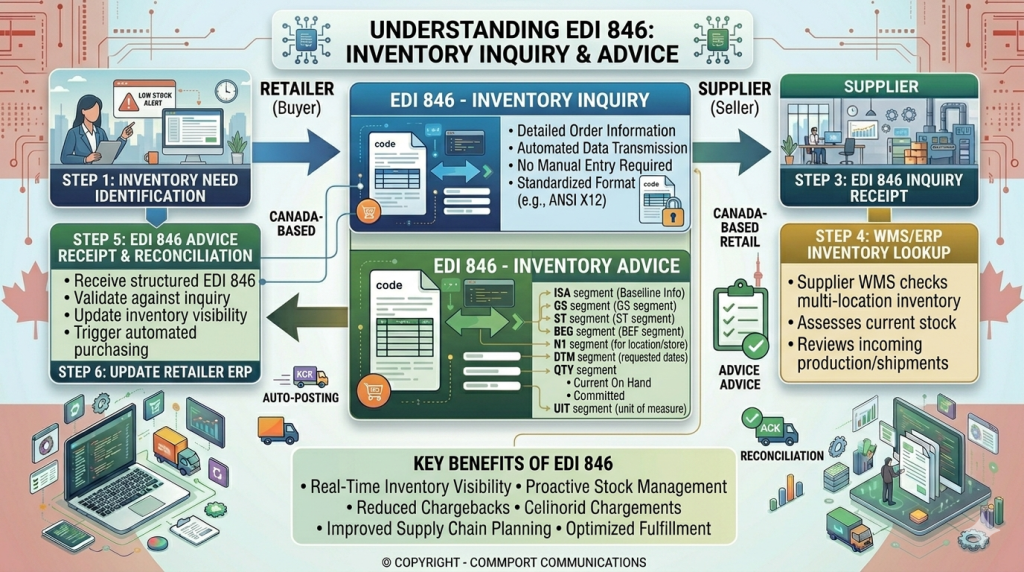
What is EDI 846 and How it Works
An EDI 846 document shares real-time updates about inventory levels between trading partners.
This transaction set functions bidirectionally, meaning either buyers or sellers can send it. When sent by a retailer, the 846 EDI document requests information about supplier stock levels and is often transmitted multiple times daily to keep eCommerce listings current.
Suppliers use the same document to share current inventory, expected replenishment dates, or discontinued items, automatically updating retailer systems with accurate stock status.
EDI 846 Document Structure and Key Segments
The document follows a structured format with specific segments.
The BIA (Beginning segment for inventory inquiry/advice) acts as the title page, specifying what the list covers and when it was created. Following that, the DTM segment records date and time references.
The LIN segment lists all items with their respective names and codes, while QTY indicates how many of each item are in stock.
Finally, the CTT segment adds up the total count of different items and quantities.
When to Use EDI 846 Inventory Advice
The 846 EDI document is mandatory within certain industries, particularly VMI (Vendor-managed Inventory) and Retail Drop Shipping.
Suppliers notify retailers of available inventory before orders are placed. Similarly, 3PLs report warehouse inventory to clients, and distributors share multi-location stock data.
An automatic replenishment agreement can trigger instant shipment of materials when stock levels drop below predetermined thresholds.
Benefits of Real-Time Inventory Visibility
Automated inventory tracking reduces manual processes and human error for all trading partners.
When products sell online, EDI instantly deducts them from inventory counts and triggers replenishment alerts.
This automation saves time and ensures data accuracy across every connected platform.
Common Challenges with EDI 846 Implementation
Accuracy presents the primary obstacle since some companies lack properly maintained inventory systems.
Timeliness creates another pressure point because retailers require suppliers to send the document daily or multiple times per day.
Product identifiers often require cross-reference tables to map internal SKUs to trading partner item numbers.
Understanding EDI 947: Warehouse Inventory Adjustment Advice
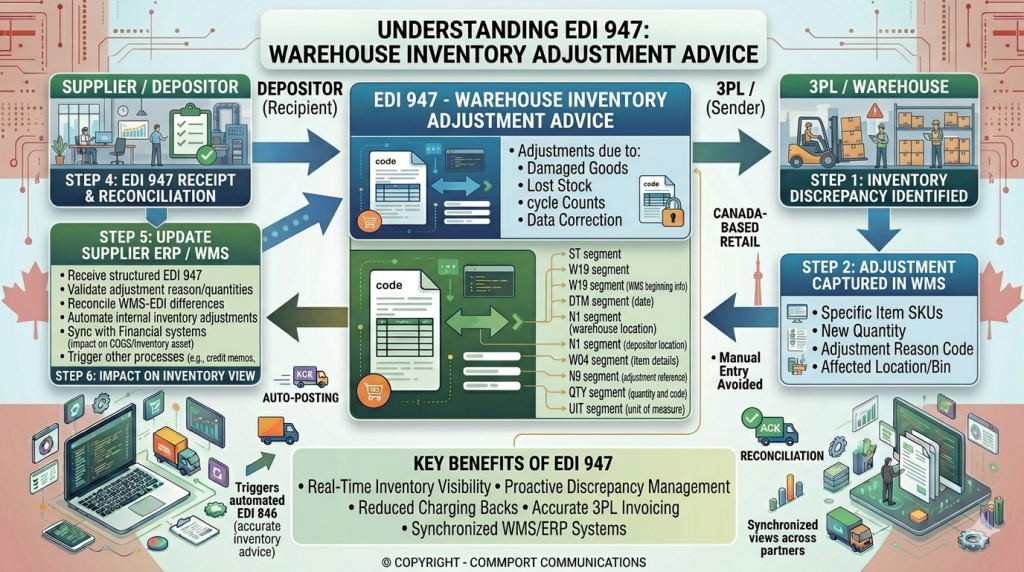
EDI 947 serves as the critical electronic notification from warehouses to trading partners about inventory changes that affect book records.
This X12 transaction set ensures depositors, such as retailers or manufacturers, stay synchronized with physical stock in 3PL or warehouse environments.
It handles everything from cycle count variances to damage reports, preventing costly discrepancies in supply chains.
What Triggers an EDI 947?
Warehouses send EDI 947 after discovering mismatches between system records and physical inventory.
Common triggers include cycle counts, physical audits, shrinkage from theft or loss, damaged goods, expirations, customer returns, or reclassifications like moving items between saleable and hold status.
It also covers gains, such as overages found during receiving or unrecorded receipts.
These adjustments often arise in high-velocity operations like retail distribution or omnichannel fulfillment, where small variances can disrupt orders or financial reporting.
By automating these notices, EDI 947 replaces error-prone emails or faxes, delivering precise details on what changed and why.
Key Components of EDI 947
The transaction follows a structured X12 format with segments that capture comprehensive adjustment data.
Segment Purpose
ST Starts the transaction set with control numbers.
W15 Header for adjustment ID, date, and summary totals.
N1/N4 Identifies warehouse, depositor, and locations like bins or zones.
N9 References prior transactions, like receipts or shipments.
W19 Core detail: item ID (UPC/SKU), quantity adjusted, reason code, lot/serial, and UOM.
SE Ends the transaction with segment and element counts.
The W19 segment shines here, specifying adjustment qualifiers like “physical inventory” (code PI) or “damaged” (DM), alongside quantities and locations for granular tracking. This supports lot-level corrections in regulated industries like pharma or food.
Benefits for Supply Chains
EDI 947 boosts inventory accuracy by automating synchronization, slashing manual reconciliations and fulfillment errors.
Trading partners gain real-time visibility into variances, improving planning, reducing stockouts, and strengthening financial controls.
For 3PLs, it builds trust through transparent breakdowns of quantities, reasons, and locations, key in outsourced models.
High-velocity sectors see faster audits, better loss tracking, and compliance with FIFO/LIFO or traceability rules.
Real-World Use Cases
Cycle Count Reconciliation: A 3PL performs weekly counts on fast-movers and sends EDI 947 for a 50-unit shortage on SKU 12345 due to shrink, updating the retailer’s ERP instantly.
Damage and Returns: Warehouse identifies concealed damage in 20 cases during putaway; EDI 947 reports the loss with photos or notes referenced aiding insurance claims.
Operational Fixes: Corrects data errors from prior EDI 944 (receipt) or 945 (shipment), such as over-reported quantities, maintaining integrity across the network.
In multi-site setups, it handles inter-warehouse transfers or regarding expired goods to “salvage,” ensuring all nodes reflect true availability.
Implementation Tips
Map reason codes consistently across partners to avoid mapping errors.
Integrate with WMS/ERP for auto-generation on count completion.
Test with sample files covering gains, losses, and lots to ensure seamless flow.
In B2B networks, pair it with EDI 846 for status updates post-adjustment, closing the visibility loop.
How EDI 832, EDI 846 and EDI 947 Work Together for Supply Chain Control
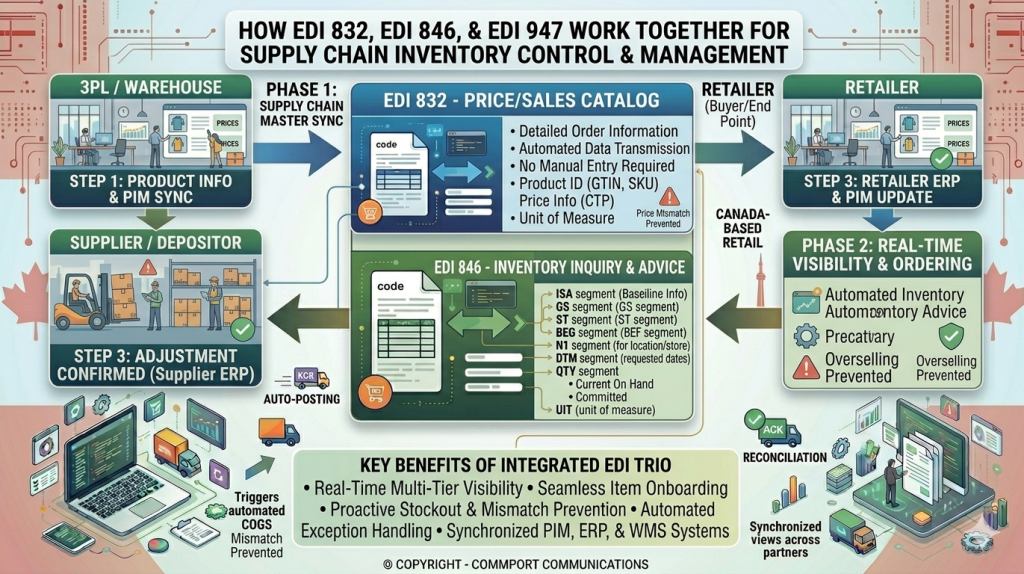
EDI 832 (Price/Sales Catalog) establishes the item master with SKUs, descriptions, pricing, and packaging details for consistent reference across partners.
EDI 846 (Inventory Inquiry/Advice) shares real-time or snapshot inventory levels, including on-hand, available, and committed quantities.
EDI 947 (Warehouse Inventory Adjustment Advice) reports changes like cycle count variances, damage, or shrinkage to update book records precisely.
Step-by-Step Workflow
These transactions integrate in a logical sequence for end-to-end inventory control.
- Catalog Foundation (EDI 832): Supplier sends 832 to retailer or warehouse, loading accurate item data into ERPs/WMS for ordering and tracking.
- Inventory Visibility (EDI 846): Partners exchange 846—supplier pushes stock status or retailer pulls it—to inform replenishment and sales promises.
- Adjustment Correction (EDI 947): Warehouse detects mismatch (e.g., cycle count), sends 947 with item, quantity change, reason code, and location details.
- Loop Closes: Recipient updates records; next 846 reflects corrected levels, maintaining trust and accuracy.
- This flow supports bidirectional communication, with 997 acknowledgments ensuring delivery.
Integration Benefits
Scenario | How They Collaborate | Outcome |
New Product Onboarding | 832 sets up item/pricing; 846 shows initial stock; 947 corrects receiving variances. | Fast, error-free ramp-up. |
Daily Replenishment | 846 provides availability; 832 confirms pricing; 947 fixes shrink post-arrival. | Fewer stockouts/overstock. |
Cycle Count/Audit | 846 baselines inventory; 947 reports adjustments; 832 ensures item match. | Accurate financials/compliance. |
3PL Operations | Warehouse uses 947 for internal changes; shares via 846; references 832 catalog. | Transparent partner visibility. |
The combination eliminates manual spreadsheets, reduces errors by 90% in automated setups, and enables real-time decisions.
Practical Implementation
Start with item master sync via 832 to avoid ID mismatches in 846/947.
Set up daily/hourly 846 feeds for visibility, triggering 947 on WMS thresholds like ±5% variance.
Use middleware for mapping and testing end-to-end flows with partners.
In retail supply chains, this trio pairs with 850/855 for orders and 856 for shipments, creating full visibility
Conclusion
EDI 846 and EDI 832 work together to create a complete picture of your supply chain operations.
When you implement both transaction sets correctly, you’ll see fewer manual errors, better inventory accuracy, and stronger trading partner relationships.
Start by integrating these documents with your existing systems, then measure performance through clear KPIs.
With the right EDI provider and proper training, you can transform inventory management from a daily challenge into a competitive advantage.
Commport EDI Solutions - #1 EDI Solutions in North America
Need Help? Download: Commport's EDI Buyers Guide
Unlock the full potential of your supply chain with our comprehensive EDI Buyer's Guide — your first step towards seamless, efficient, and error-free transactions
Frequently Asked Questions
EDI 846 provides information about current inventory levels and product availability, while EDI 852 tracks product activity data such as sales transactions and inventory movements. Both serve different purposes in supply chain visibility.
An EDI 846 (Inventory Inquiry/Advice) is an electronic document that transmits inventory information between trading partners. It replaces paper-based inventory reports and allows customers to share their current stock levels and availability with suppliers in a standardized digital format.
A complete EDI system requires four core components: an EDI translator to convert documents, mapping tools to align data formats, a secure network for transmission, and ongoing technical support. For full automation, businesses should also integrate EDI with internal systems like ERP or warehouse management software.
EDI 832 is a digital price and sales catalog that suppliers use to share product information and pricing details electronically with trading partners. It includes seller contact information, product descriptions, pricing per unit, terms of sale, and replaces traditional paper catalogs.
EDI 832 establishes the foundation by defining product specifications, pricing, and item identifiers, while EDI 846 reports real-time stock levels for those products. Together, they provide a complete view of what products are available and how much inventory exists, enabling more accurate ordering and better supply chain control.