


Introduction to Product Data Management Across Multiple Platforms
Poor product data management costs businesses $12.9 million annually, according to Gartner.
Disorganized product information leads to misplaced files, incorrect specifications, and unnecessary rework that impacts profitability.
Manufacturers are projected to generate 4.4 zettabytes of data annually by 2030, making efficient data management more critical than ever.
We’ve compiled the top 10 strategies to help you manage product data effectively across multiple platforms, including implementing centralized product data management systems, establishing governance standards, and leveraging automation tools.
Here is the list of the top 10 product data management strategies
- Implement a centralized product data management system
- Establish product data governance and quality standards
- Automate product data synchronization across platforms
- Integrate your product management tool with enterprise systems
- Standardize product data formats and taxonomies
- Implement version control and change management
- Optimize for multi-channel distribution
- Leverage cloud-based product data management solutions
- Establish clear access control and security protocols
- Monitor performance and continuously improve
Key Takeaways
- Centralize your product data to achieve 30% faster data retrieval, 25% better team collaboration, and a 20% reduction in time-to-market
- Establish data governance and quality standards with clear roles and validation rules to prevent 73% of quality issues through early pipeline validation
- Automate data synchronization across platforms using change data capture and real-time integration tools to eliminate manual errors and save 20-30% of annual revenue
- Integrate with enterprise systems (ERP, PLM, CRM) through API connectors and hub architectures to ensure seamless data flow and eliminate operational silos
- Standardize data formats and taxonomies using industry standards like ECLASS and ISO protocols to ensure cross-platform compatibility and reduce processing confusion
- Implement version control and change management with automated tracking and audit trails to enable safe experimentation and maintain data integrity across environments
Reddit Discussion Around Product Data Management Strategies
Use a central hub for product data, with one source feeding multiple marketplaces. One Reddit comment notes that sellers often use a Shopify store as the central place to manage listings before pushing them to other channels.
Create platform-specific templates for titles and listings. A multi-platform seller said they keep one core product record and use formulas to generate versioned titles for each channel, cutting setup time significantly.
Use integration or sync tools when manual tracking becomes unmanageable. Reddit users mention tools and workflows like Sellbrite, Pipe17, Zapier, Airtable, and spreadsheet-based automations for syncing products, inventory, and orders.
Standardize and normalize data before syndicating it. A recurring suggestion is to clean up attributes, prevent duplicate or inconsistent entries, and structure data so each platform gets the right fields.
For smaller teams, spreadsheets can work as a starting point, but they become fragile at scale. Several Reddit replies suggest Google Sheets or Airtable as a practical middle ground before moving to a database or a dedicated multichannel platform.
Other Subreddits to follow on this topic
1. Implement a Centralized Product Data Management System

A centralized product data management system consolidates all product-related information into a single, structured repository that serves as the framework of processes, tools, and policies governing how organizations collect, store, secure, and leverage data.
This platform houses technical drawings, CAD files, bills of materials (BOMs), compliance documents, specifications, and manufacturing details in one accessible location.
The system guarantees that every model, drawing, and document is secured and easily found in a central repository.
Part and document searches leverage the full history and associated relationships of each piece of content, ensuring that teams across engineering, procurement, and manufacturing have access to identical product specifications.
Metadata tagging, search filters, and classification structures improve accessibility, allowing teams to locate the correct data without delays.
Key Benefits of Centralization
Centralizing product data eliminates the disorganization that occurs when data is stored in spreadsheets or disparate sources.
Engineers in organizations without a robust product data management system spend 25% more time on nonproductive data management tasks
Conversely, companies implementing centralized systems report a 30% reduction in data retrieval times.
Collaboration improves significantly through shared platforms.
Automated notifications alert teams to pending approvals, changes, or required updates, eliminating communication gaps.
Businesses leveraging these systems can reduce their product time-to-market by 20%, gaining a competitive edge.
Role-based permissions in centralized systems restrict sensitive data to authorized users while maintaining accessibility for approved personnel.
Audit trails log every access or modification, safeguarding intellectual property and ensuring compliance with data protection regulations.
Moreover, companies report up to a 40% improvement in workflow management.
2. Establish Data Governance and Quality Standards
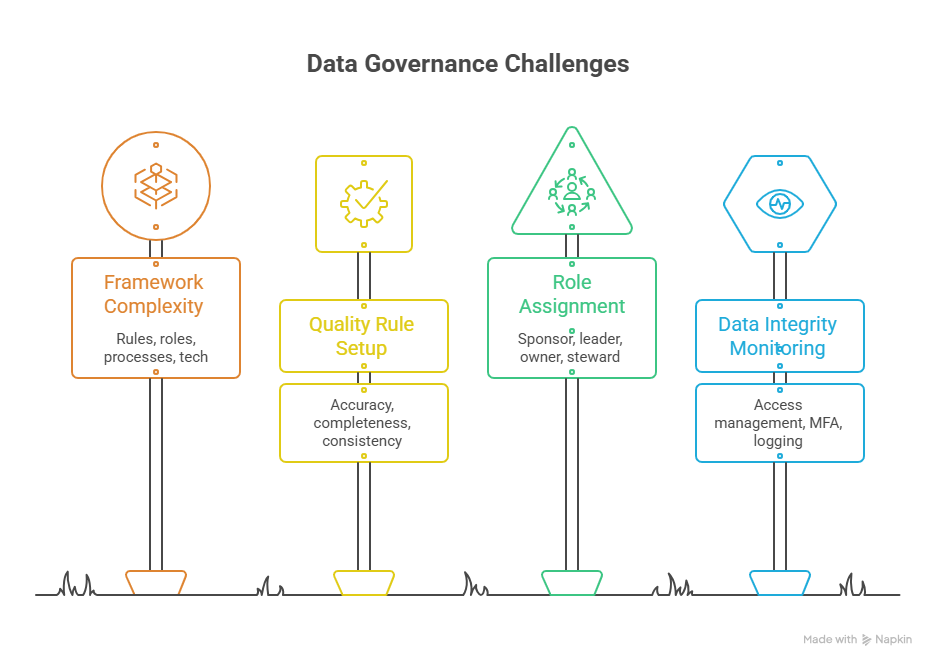
A data governance framework defines how organizations manage data assets through structured models that outline the rules, roles, processes, and technologies required to ensure data is trustworthy, secure, and aligned with business objectives.
The framework acts as a blueprint for consistent data oversight, enabling informed decisions and regulatory compliance.
Robust frameworks include vision and strategy connecting governance to business goals, guiding principles articulating core beliefs like transparency and ownership, and data stewardship assigning responsibility for maintaining quality.
Technology infrastructure uses tools like data catalogs and metadata repositories, whereas policies and standards codify rules for data classification, retention, and usage.
Poor data quality costs an average of $12.90 million per year in lost productivity alone.
Setting Up Data Quality Rules
Data quality rules are predefined criteria establishing how to measure and monitor the accuracy, completeness, consistency, timeliness, uniqueness, and validity of datasets.
These rules function as guardrails, preventing low-quality data from entering source systems through validation.
Organizations embedding validation early in data pipelines experience 73% fewer quality issues than those relying on downstream corrections.
Data quality efforts should focus on preventing errors rather than correcting records. Rules automate data governance by running validation by exception, meaning stewards only manually review information that does not match established criteria.
Assigning Roles and Responsibilities
Clear role definition proves crucial for building strong governance foundations. The Data Governance Sponsor, typically a C-suite executive, champions the initiative and provides necessary resources.
The Data Governance Leader steers the overall program, providing strategic direction and ensuring alignment with organizational goals.
Data Owners hold accountability for specific data domains, defining policies and standards while working closely with Data Stewards.
Data Stewards execute day-to-day governance activities, ensuring data is properly classified, documented, and protected according to defined policies.
The Data Governance Coordinator manages program establishment, monitoring, improvement, documentation, and training.
Monitoring Data Integrity
Access management prevents unauthorized data modifications through role-based access control, structuring permissions around job functions.
Multi-factor authentication reduces account compromises by 99.9%, protecting sensitive product information from credential theft.
Comprehensive logging captures every data access and modification, creating audit trails that answer critical questions during security investigations and compliance audits.
Effective logs record user identity, timestamp information, actions performed, data assets accessed, system-originating requests, and success or failure status.
Continuous monitoring identifies existing data assets no longer meeting quality standards and key performance indicators.
3. Automate Data Synchronization Across Platforms

Automating product data synchronization eliminates tedious manual processes that take IT personnel away from higher-level tasks.
Without synchronization tools, teams manually propagate record changes through ecosystems using time-consuming data entry that increases the likelihood of human error.
Organizations spending excessive time maintaining integrations signal the need for automated solutions.
Real-time product data synchronization has become a standard expectation.
Stakeholders now demand up-to-date data continuously rather than once-daily updates.
Automated integrations boost operational efficiency by saving time, enhancing data accuracy, and enabling faster decision-making.
Process inefficiencies can cost companies 20-30% of annual revenue, making automation a direct revenue protection measure.
Moreover, 90% of executives consider automation extremely or very important for achieving organizational goals.
Commport Datapool Solutions enables you to centralize, enrich, and sync all your product data to your trading partners from one centralized platform, trusted by 3000+ brands.
Tools and Technologies for Data Automation
Data synchronization tools automate keeping data consistent across different locations or systems. The sync landscape includes database replication, change data capture (CDC) tools for operational consistency, and integration platforms for SaaS application sync.
Real-time synchronization captures and propagates changes within seconds, essential for inventory management and live dashboards.
Batch synchronization runs at scheduled intervals, working well for analytics workloads where data freshness is less critical.
Change data capture identifies only modified data since the last sync rather than re-scanning entire tables.
CDC reads transaction logs to detect inserts, updates, and deletes as they occur, resulting in lower latency and reduced load on source systems.
Setting Up Automated Workflows
Implementation succeeds when it starts narrow and expands deliberately.
Begin by auditing current data processes: map existing workflows, estimate time spent, identify failure points, and flag compliance-sensitive processes.
Select your automation stack deliberately by matching tools to specific layers rather than expecting one tool to handle all orchestration needs. Pilot with high-impact, lower-complexity workflows like daily data ingestion or recurring batch jobs.
Avoiding Common Automation Pitfalls
Organizations starting with stale, duplicated, or error-riddled reference data simply move bad information faster through automation.
Establish a single source of truth before automating processes and add human validation layers.
Relying solely on automation without business context creates underutilized systems. Tools do not change outcomes on their own; people need clarity on why automation exists and how success will be measured.
Implement comprehensive monitoring by tracking lag, error rate, throughput, and record counts for every sync pipeline.
4. Integrate Your Product Data Management Tool with Enterprise Systems
Critical Integration Points (ERP, PLM, CRM)
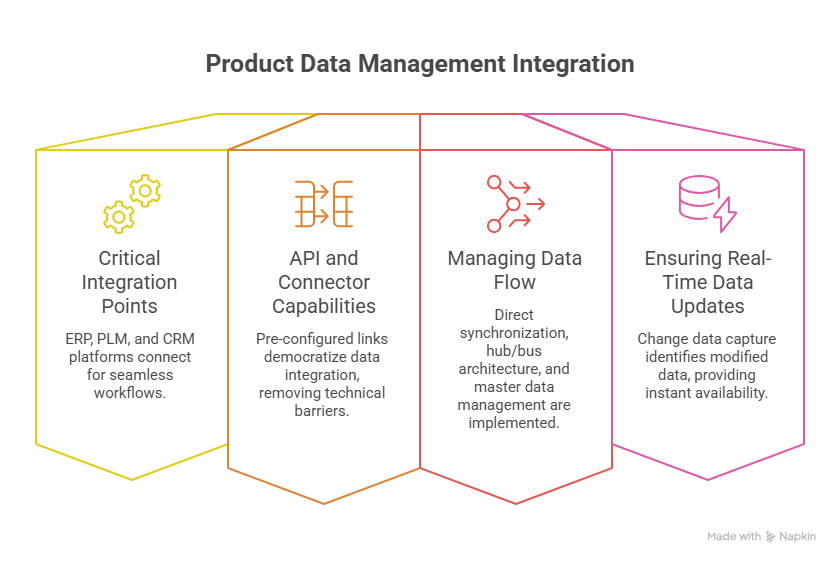
Product data management systems connect with ERP, PLM, and CRM platforms to create seamless operational workflows. Product and engineering data flows from PLM software to ERP systems, connecting BOM management, manufacturing instructions, procurement, supply chain management, and financial planning. When a design change occurs in PLM, it automatically updates in ERP, avoiding costly production errors or supply chain delays.
Seamless integration with ERP and CRM systems enables real-time data access for sales, procurement, and support teams. Support can access the latest specifications and warranty information, improving response accuracy and efficiency. This creates a smooth, end-to-end digital process supporting full requirements traceability, version control, and real-time updates across departments.
API and Connector Capabilities
API connectors provide pre-configured links between applications, acting as intermediaries that translate requests and data formats between systems. These connectors democratize data integration by removing technical barriers typically associated with connecting disparate systems. Instead of hiring developers to write custom code for each integration, organizations establish connections within minutes.
Modern connectors support bi-directional data sync, real-time or near-real-time data transfer, automatic data transformation, and robust error handling with monitoring capabilities. Authentication options include OAuth 2.0, API Key, Basic Auth, and custom headers, with encryption in transit and at rest. The total cost of ownership for custom-built integrations is substantial, whereas connector providers handle ongoing maintenance and API updates.
Managing Data Flow Between Systems
Organizations implement three primary integration patterns. Direct synchronization involves point-to-point integration using APIs or file exports, though this becomes complex as system numbers increase. Hub/bus architecture with connectors uses a central hub managing communications between systems, simplifying additions or removals while improving scalability. Data-centric master data management creates a central repository for critical business data, ensuring consistency and accuracy across all systems.
Integration success requires addressing two critical aspects: data consistency, accuracy, and synchronization through proper transformations and validation; and process alignment, ensuring workflows coordinate efficiently to avoid bottlenecks.
Ensuring Real-Time Data Updates
Real-time data integration captures, processes, and delivers data immediately after creation, minimizing delays. Change data capture identifies only modified data since the last sync, reading transaction logs to detect inserts, updates, and deletes as they occur. This results in lower latency and reduced load on source systems, providing instant data availability for faster decision-making.
5. Standardize Product Data Formats and Taxonomies

Creating Consistent Data Structures
Standardization involves defining uniform formats for data elements across organizations, ensuring all information adheres to specific, predefined rules.
The process precedes both harmonization and normalization, establishing how data is formatted and stored across different systems.
This includes standardizing street names (avoiding variations like “main street” versus “Main St”), unit designations, city names, state abbreviations, and postal codes.
Consistent formatting eliminates confusion in data processing and improves operational efficiency.
Developing Universal Naming Conventions
Naming conventions provide frameworks guaranteeing everyone names analytics events, properties, and attributes identically.
The underscore delimiter separates fields, and only alphanumeric characters should be used, with hyphens permitted for free-form text.
Case consistency is critical for transformation tools to work efficiently.
All dates must follow ISO 8601 format (YYYY-MM-DD), and standard ISO codes should be used for country, language, and currency.
Organizations should assign defined owners to maintain naming conventions and taxonomies, with central authority responsible for updates.
Building Scalable Taxonomy Systems
These rules define allowed categories, hierarchies, and relationships between data types, ensuring consistent categorization.
In retail contexts, products are classified under hierarchical levels (Electronics > Mobile Phones > Smartphones), facilitating navigation and management.
Classifications describe what products physically are, while categories reflect merchandising strategy and where customers find items.
Industry standards like ECLASS cover over 45,000 product classes in manufacturing sectors, whereas ETIM serves electrical and HVAC industries.
GDSN provides the largest product information network, maintaining standardized, updated data,
Maintaining Cross-Platform Compatibility
Syntactic interoperability ensures data exchanges between systems using compatible formats like XML or JSON.
Semantic interoperability preserves data meaning consistently across systems through common vocabularies and data models.
Organizations must adopt widely accepted data standards and protocols to ensure compatibility.
Cloud computing provides scalable solutions for standardization, allowing real-time data storage, processing, and sharing.
AI and machine learning algorithms automatically detect discrepancies and recommend standardization approaches.
Download: GDSN Buyers Guide
Empower your business with global data synchronization; download our GDSN Buyer's Guide today and take the first step towards streamlined, accurate, and compliant product data management.
6. Implement Version Control and Change Management
Why Version Control Is Critical
Versioning enables higher velocity of data teams while reducing the cost of errors.
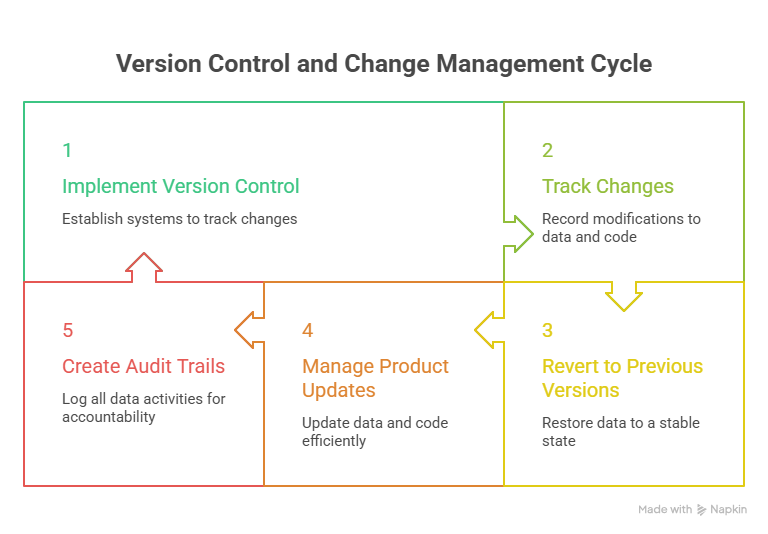
Product data management systems require mechanisms to track changes over time, providing visibility into project development and showing what has been added, modified, and removed.
The ability to revert objects in production to previous versions minimizes risks when unexpected problems occur with current versions.
Version control proves essential for people working in data integration processes because incorrect data can be fixed by restoring an earlier, correct state.
Without this capability, organizations struggle to identify when problems were introduced, how long they have existed, and what scope of data has been affected.
Damage mitigation and accountability become possible through record-keeping that tracks who did what, when, why, and how.
Setting Up Automated Version Tracking
File versioning can be tracked with naming conventions, such as appending version numbers like “_v03” at the end of file names.
Versioning can also use dates, preferably following ISO 8601 format (YYYY-MM-DD). Version control systems record changes to files by storing commits or revisions, with each revision including metadata about who made the change and when.
Version control software allows multiple people to work together on the same project simultaneously, enabling collaboration and accountability.
Teams must check application code, dependencies, database schemas, environment creation tools, container files, automated tests, deployment scripts, and cloud configuration files into shared version control repositories.
Managing Product Data Updates
A core benefit is the ability to keep history and revert changes, allowing teams to easily undo modifications.
This gives more opportunity to experiment, eliminating the fear of breaking existing code or data structures.
Branching assists with deployment and release management, simplifying maintenance of multiple product data versions across development, testing, staging, and production environments.
Creating Audit Trails
A data audit trail is a detailed log of every action or activity taken related to data, including any time data is created, modified, relocated, or deleted.
Modern audit trails include user attribution showing who took action, timestamps indicating exact date and time, defined actions specifying what occurred, before and after values for all modifications, and linked documentation explaining why changes were made.
Entries must be tamper-proof and immutable, with no ability to delete historical activity. Data versioning improves compliance by letting teams use audit functions to review data modifications, which systems meticulously track.
7. Optimize for Multi-Channel Distribution
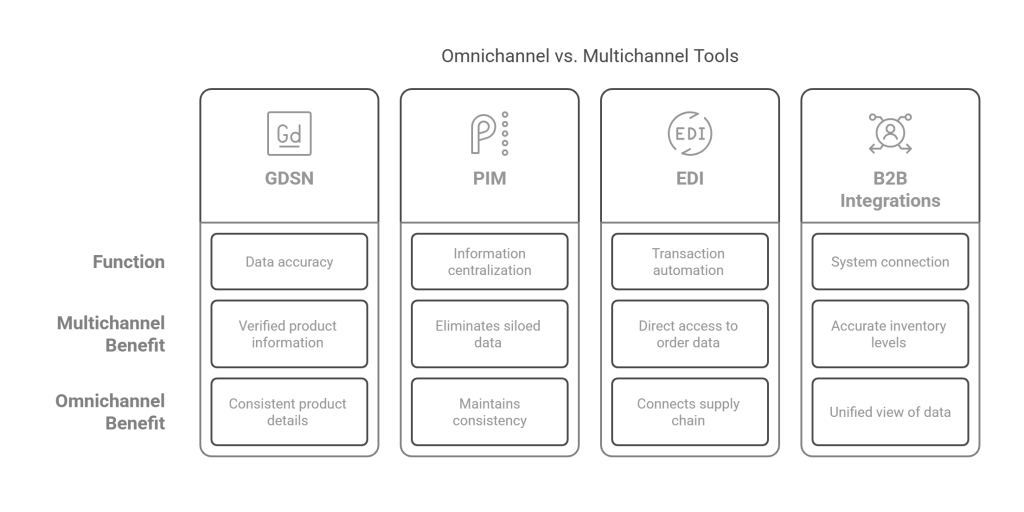
Understanding Multi-Channel Data Requirements
Multi-channel ecommerce means selling products online across multiple platforms, such as Amazon, Walmart, Shopify, eBay, and your own website.
Each sales channel operates independently from an inventory management, order fulfillment, and customer data standpoint.
However, this independence creates operational challenges, including overselling inventory and missing delivery deadlines. Understanding the data requirements of all channels becomes key to determining the technical specifications that produce tangible business results.
Platform-Specific Data Optimization
Different channels have unique requirements and attributes.
For example, an e-commerce website might need high-resolution images, while a mobile app may prioritize concise descriptions.
Each sales channel has its own way of managing variants, with specific rules and setup requirements that sellers need to understand.
To share a single stock quantity and a single SKU code, unlike all other platforms, Etsy allows listings with multiple variants, which require stock tracked per variant.
Amazon’s system supports both merged parent-child relationships and independent variant listings.
Ensuring Consistent Product Information
Brand integrity depends on consistent product information, including descriptions, images, and pricing, across all channels.
Contradiction-free product information across all sales channels is the fundamental requirement for a successful approach.
When product data isn’t identical throughout the entire customer journey, it causes confusion for customers and damages their trust in the company.
Managing Channel-Specific Variations
Listing information, such as product descriptions, prices, and photos, may be customized per channel.
A flexible data model accommodates these variations, allowing businesses to include details relevant to each channel while maintaining consistency.
Product data management solutions provide one source of truth for all data and automatically sync listing updates to all channels.
8. Leverage Cloud-Based Product Data Management Solutions
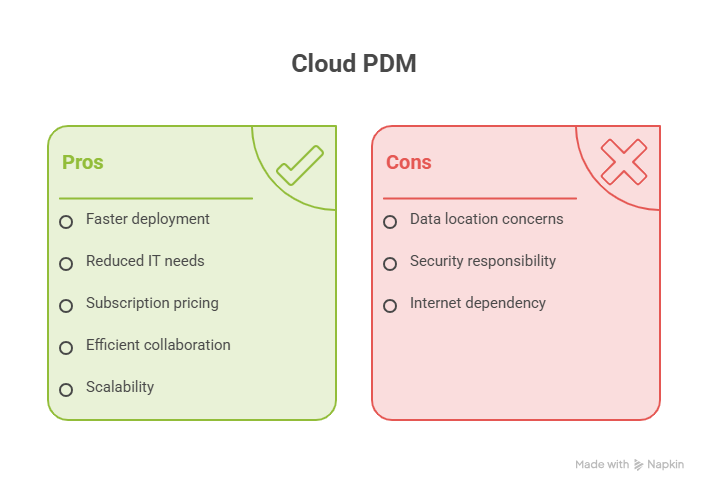
Cloud-based product data management systems shift infrastructure management to vendors who host platforms on secure servers through Microsoft Azure or Amazon AWS.
Deployment happens faster and simpler because there is no server setup required on the customer end.
For smaller engineering businesses, the absence of IT knowledge requirements removes a significant barrier, as teams no longer need dedicated IT personnel to manage systems.
Subscription-based pricing structures spread costs over monthly or annual periods, reducing upfront expenditures.
These subscriptions include hosting, updates, support, and backups as part of the package.
Cloud product data management enables efficient collaboration with real-time accessibility, secure data sharing, and version control, allowing multiple users to access identical data simultaneously from anywhere.
Platforms hosted on providers like Microsoft Azure typically guarantee 99.95% uptime
Scalability and Flexibility Advantages
Cloud platforms scale seamlessly without requiring physical hardware purchases or installations.
Adding users or storage becomes straightforward when infrastructure constraints disappear.
Growing teams benefit from flexibility by adjusting usage based on shifting business demands without capital investment in servers.
Security and Access Control Features
Reputable cloud providers implement robust security measures, including layers of firewalls, encryption, and monitoring that most small or mid-sized businesses struggle to match independently.
Security responsibility is shared between the provider and the user.
Role-based permissions prevent unauthorized modifications while allowing designated personnel to retrieve necessary files.
Authentication verifies user identity through mechanisms like multi-factor authentication, while authorization determines access levels based on specified policies.
Choosing Between Cloud and On-Premise
Organizations should evaluate data location and hosting providers to ensure compliance with local data regulations.
On-premise infrastructure provides complete control over dedicated resources and addresses data governance concerns.
Hybrid systems combine on-premises and cloud infrastructure, allowing critical data storage on internal servers while using cloud tools for collaboration.
Lean teams valuing flexibility, speed, and lower overhead find cloud-based product data management systems better suited to their operational needs.
9. Establish Clear Access Controls and Security Protocols

Setting Up Role-Based Permissions
Role-Based Access Control restricts system access based on roles assigned to users rather than granting permissions individually.
RBAC associates permissions with defined roles such as administrator or analyst, and users gain those permissions by being assigned to the roles. In practice, roles correspond to job functions within organizations, and their permissions reflect the minimum access needed to perform those functions.
Apply least privilege by granting access only as needed for the job function. Standard roles include viewers who see designs without making changes, contributors who create and modify files, and approvers who authorize engineering changes.
Protecting Sensitive Product Data
Encrypt sensitive information stored on computer networks, laptops, or portable storage devices used by employees. Store paper documents or files containing personally identifiable information in locked file cabinets, limiting access to employees with legitimate business needs.
Restrict employees’ ability to download unauthorized software, as downloaded software could distribute malware.
Compliance and Regulatory Requirements
GDPR requires companies to process personal data in ways that guard against unauthorized collection, processing, loss, damage, or destruction.
HIPAA calls for healthcare organizations to enforce data security by ensuring confidentiality, integrity, and availability of protected health information. Organizations subject to PCI DSS must create secure networks and implement effective access controls for cardholder data.
Managing User Authentication
Multi-factor authentication adds security by requiring users to provide two or more verification methods before accessing systems.
Require MFA for all accounts that can access sensitive repositories.
Control access to sensitive information by requiring employees to use strong passwords with a mix of letters, numbers, and characters. Review access periodically, with quarterly reviews being a common baseline, and remove stale permissions quickly.
10. Monitor Performance and Continuously Improve
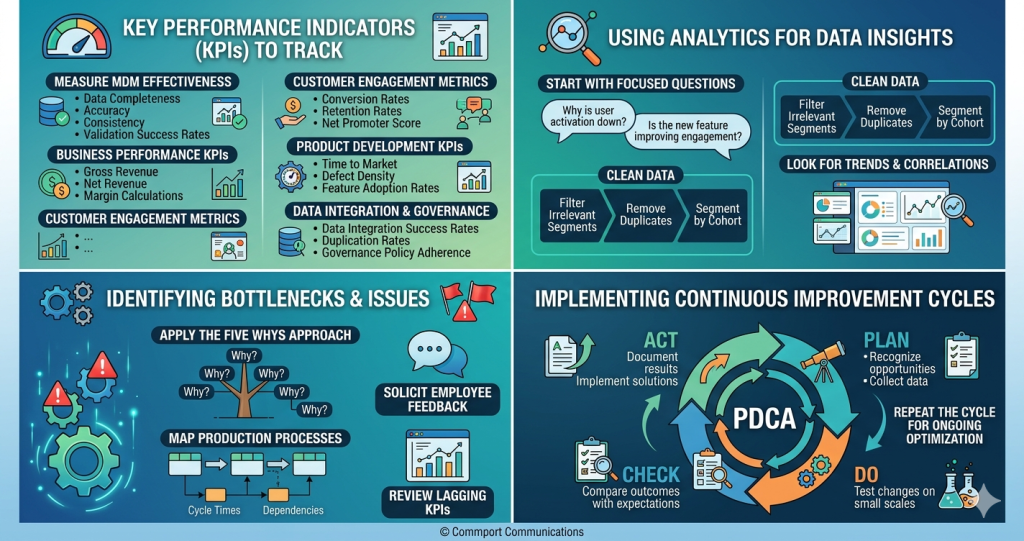
Key Performance Indicators to Track
Monitor data completeness, accuracy, consistency, and validation success rates to measure master data management program effectiveness.
Business performance KPIs focus on gross revenue, net revenue, and margin calculations.
Customer engagement metrics include conversion rates, retention rates, and Net Promoter Score.
Product development KPIs assess time to market, defect density, and feature adoption rates.
Track data integration success rates, duplication rates, and governance policy adherence.
Using Analytics for Data Insights
Start with focused questions tied to product vision: “Why is user activation down?” or “Is the new feature improving engagement?”
Clean data by filtering irrelevant segments, removing duplicates, and segmenting by cohort.
Look for trends, outliers, and correlations that answer questions using dashboards and visualization tools.
Identifying Bottlenecks and Issues
Apply the Five Whys approach by asking “why” multiple times to trace problems to root causes.
Map production processes with value stream diagrams showing cycle times and dependencies. Solicit employee feedback through blame-free channels, as floor-level workers encounter bottlenecks firsthand.
Review lagging KPIs regularly to uncover small inefficiencies.
Implementing Continuous Improvement Cycles
The PDCA cycle provides an iterative approach for continuous improvement. Plan by recognizing opportunities and collecting relevant data.
Do by testing changes on small scales. Check by comparing outcomes with expectations.
Act by documenting results and implementing successful solutions. Repeat the cycle for ongoing optimization.
Conclusion
Although implementing these ten strategies might initially appear overwhelming, the approach becomes manageable when tackled systematically.
Start by centralizing your product data, then establish governance standards and automate synchronization workflows.
Once your foundation is solid, focus on integration, standardization, and version control.
Remember, organizations that invest in proper product data management report 30% faster data retrieval and a 20% reduction in time-to-market.
The statistics speak for themselves. Specifically, poor data management costs businesses $12.9 million annually, making this investment critical for your bottom line.
Commport GDSN Datapool - #1 GDSN Datapool Provider in North America
Download: GDSN Buyers Guide
Empower your business with global data synchronization; download our GDSN Buyer's Guide today and take the first step towards streamlined, accurate, and compliant product data management.
Frequently Asked Questions
Centralized product data management systems consolidate all product information into a single repository, leading to significant operational improvements. Organizations typically experience a 30% reduction in data retrieval times and a 25% increase in team collaboration efficiency. These systems also help reduce product time-to-market by 20% and improve overall workflow management by up to 40%, while eliminating the disorganization that occurs when data is scattered across multiple spreadsheets or systems.
Data governance establishes a structured framework of policies, processes, and responsibilities that maintain high levels of data quality throughout the entire data lifecycle. Organizations that embed validation early in their data pipelines experience 73% fewer quality issues compared to those relying on downstream corrections. This approach focuses on preventing errors rather than correcting them after they occur, which is crucial since poor data quality costs businesses an average of $12.9 million annually in lost productivity.
Automation eliminates time-consuming manual data entry processes that increase the likelihood of human error and take IT personnel away from higher-level tasks. Real-time synchronization has become a standard expectation, with stakeholders demanding continuously updated data rather than once-daily updates. Automated integrations boost operational efficiency by saving time, enhancing data accuracy, and enabling faster decision-making, which is critical since process inefficiencies can cost companies 20-30% of their annual revenue.
Version control enables teams to track changes over time, providing complete visibility into project development and showing what has been added, modified, or removed. It allows organizations to revert to previous versions when unexpected problems occur, minimizing risks and reducing the cost of errors. This capability is essential for identifying when problems were introduced, how long they’ve existed, and what scope of data has been affected, while also providing accountability through detailed records of who made changes, when, and why.
Cloud-based systems shift infrastructure management to vendors who host platforms on secure servers, eliminating the need for on-premise setup and dedicated IT personnel. They offer faster deployment, subscription-based pricing that spreads costs over time, and seamless scalability without requiring physical hardware purchases. Cloud platforms typically guarantee 99.95% uptime and enable efficient real-time collaboration, allowing multiple users to access identical data simultaneously from anywhere, making them particularly suitable for growing teams that value flexibility and lower overhead.