


Data Integrations vs Application Integration
Data integration consolidates information from multiple sources into a single repository (usually a data warehouse or lake) for analysis, most often via batch ETL. Application integration connects software systems in real time through APIs and messaging, so they trigger each other’s workflows automatically.
The two solve different problems: data integration answers “what happened”; application integration answers “do something now.”
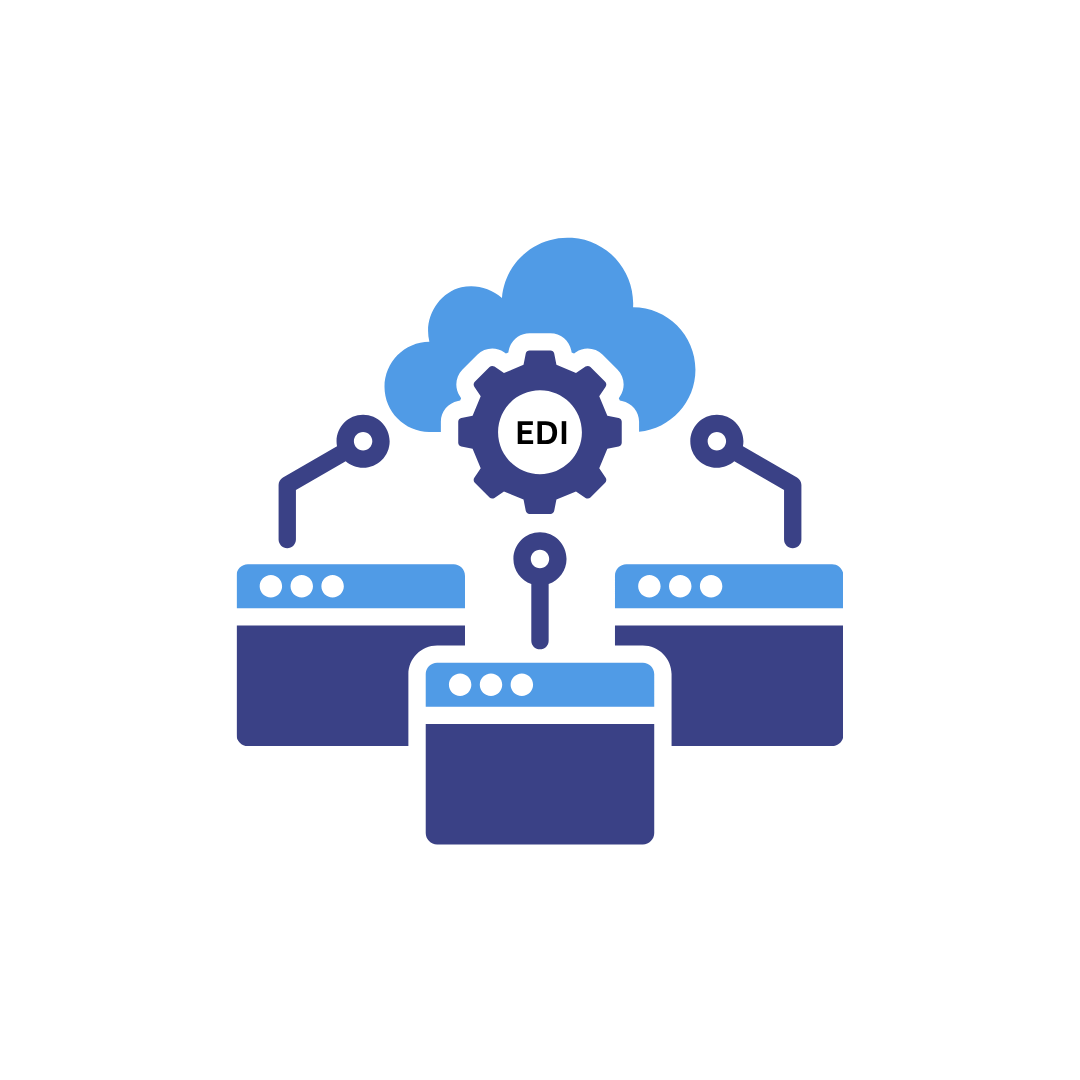
EDI integration bridges both. It standardizes business documents (purchase orders, invoices, shipping notices) into formats like ANSI X12 and EDIFACT, so the same exchange feeds your analytics and drives real-time transactions between trading partners and your ERP.
Why This Decision Matters
When your order data lives in one system, your inventory counts in another, and your customer records in a third, every report you run starts with a reconciliation problem.
You cannot analyze what you cannot bring together, and you cannot act on what your systems will not pass between each other.
That gap is where the data integration vs application integration question becomes practical rather than academic.
Data integration pulls scattered information into a single view so you can report on it.
Application integration wires your software together so a change in one place updates everything else.
Both matter, and picking the wrong one for a given job wastes budget and stalls projects.
EDI integration sits across both, which is why it keeps coming up in these conversations.
Key Takeaways
- Data integration is for analysis. It uses ETL, ELT, and change data capture to combine records into a warehouse or lake for reporting and business intelligence.
- Application integration is for action. It links applications through APIs, webhooks, and middleware so workflows run in real time without manual re-keying.
- EDI integration does both. Standardized documents feed analytics and drive live transactions between your systems and your trading partners.
- Most companies need a hybrid model. Batch consolidation for reporting, real-time connectivity for operations, and EDI to standardize the exchange in between.
- Implementation hinges on three things. Platform scalability, compliance with GDPR, HIPAA, and SOC 2, and a plan for legacy systems and API rate limits.
What Is Data Integration
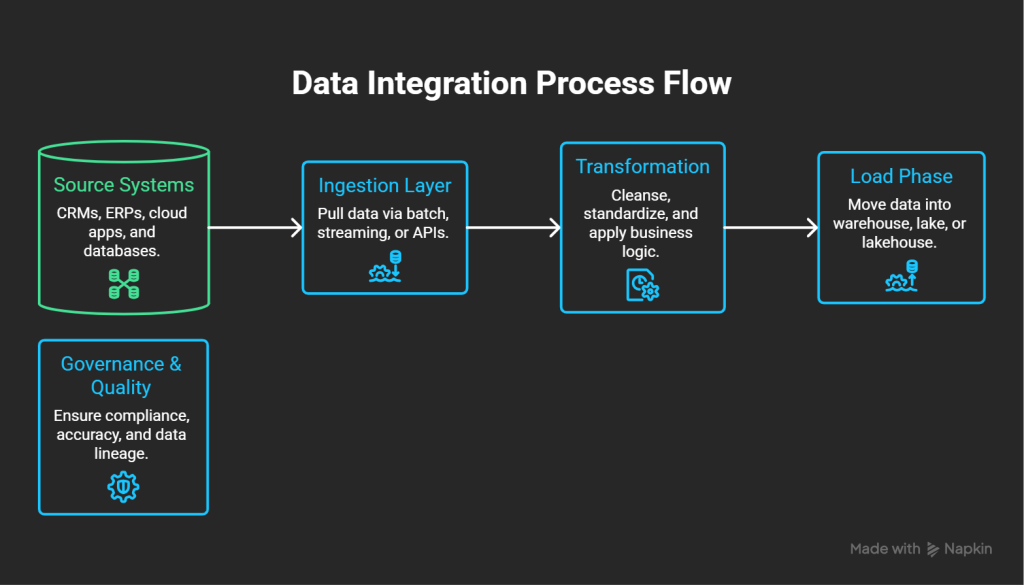
Data integration brings information from many sources into one coherent system for analysis and decision-making. The process replicates, ingests, and transforms different data types into standardized formats, then stores them in a target repository such as a data warehouse, data lake, or lakehouse.
Core Components of Data Integration
A working data integration architecture stacks several layers. Source systems hold the original records: CRMs, ERPs, cloud apps, databases, and IoT devices.
Connectors bridge those sources to the integration platform and automate the transfer.
The ingestion layer pulls data into the pipeline through batch loads, streaming, or APIs.
The transformation layer then cleanses, standardizes, and reformats raw data so it works across systems.
Orchestration coordinates movement across all layers, metadata management tracks definitions and lineage, and governance tools watch quality, access, and compliance.
The ETL Process: Explained
ETL extracts data from source systems, transforms it into a consistent format through cleansing and business logic, then loads it into a target such as a data warehouse.
During extraction, the tools copy raw data into a staging area for temporary storage.
Transformation applies your business rules.
Basic steps remove errors, fill empty fields, and simplify records; cleansing maps source data to target formats, and deduplication drops repeat records.
Advanced steps calculate derived values and join data from different sources to make it easier to analyze.
In the load phase, the transformed data moves from staging into the warehouse, usually as one full initial load followed by periodic incremental loads.
Data Integration Methods Beyond ETL
Teams use several techniques depending on speed and flexibility.
ELT loads raw data into storage first and transforms it there, which supports faster processing and more flexible management.
Real-time integration captures and delivers data the moment it becomes available.
Change data capture spots changes in a source and applies them to the warehouse immediately, keeping systems in sync while using fewer resources.
Data virtualization builds a virtual layer between sources and consumers, so users get a unified view without physically moving anything.
Data replication keeps multiple copies across locations to cut latency and improve performance.
Data Quality and Governance
Governance sets the policies, roles, and responsibilities for managing data across the organization, and it only works when quality practices run through every policy and metric.
You cannot govern data well if it arrives incomplete, inaccurate, or inconsistent. Strong programs build ongoing quality assurance: metrics, audits, and a clear process for resolving issues as they surface.
What Is Application Integration
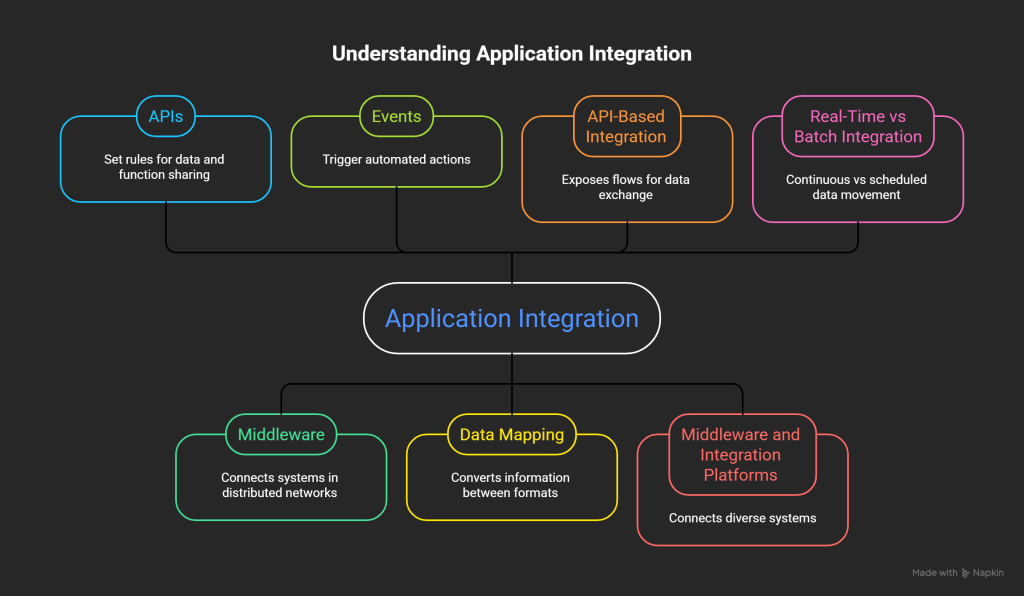
Application integration connects software at a functional level, so systems exchange data in real time and run workflows together. Rather than consolidating records for later analysis, it links applications directly so they act on each other’s events across a network. Without it, staff re-key data by hand, which kills any chance of real-time transmission.
Key Components of Application Integration
APIs form the foundation. They set rules that let software components share data and functions, acting as bridges between applications through standards like REST, SOAP, and GraphQL. Middleware provides the connective tissue in distributed networks, binding different systems together. Events, such as a file upload or a status change, trigger automated actions. Data mapping and transformation convert information between formats so applications with different field structures can still understand each other.
API-Based Integration
API integration exposes flows and connects enterprise software for data and service exchange. Modern application design favors flexible exchange for efficiency and reuse, letting developers build on existing services with less code. APIs handle both simple links, like an e-commerce store talking to a payment processor, and complex enterprise platforms swapping database records in real time. Webhooks extend this with HTTP callbacks that fire on events, triggering exchange automatically when something happens.
Middleware and Integration Platforms
Integration middleware connects applications across IT ecosystems, from cloud SaaS to legacy on-premises systems. Integration Platform as a Service (iPaaS) offers cloud platforms with pre-built connectors and transformation tools for integrating apps, data, and processes. An Enterprise Service Bus centralizes integration through a bus architecture that supports many protocols and formats. Message-oriented middleware enables asynchronous communication through queues, so systems exchange messages without a direct connection.
Real-Time vs Batch Integration
Real-time integration moves information continuously as events happen, pushing changes downstream within milliseconds or seconds. Event-driven architectures power this: source systems fire events that middleware processes and delivers. Batch processing takes the opposite approach, gathering data over a set window and moving it all at once during scheduled runs, hourly or overnight.
Data Integration vs Application Integration: Key Differences
Both approaches manage data, but they serve different needs with different methods and outcomes.
Scope and Purpose
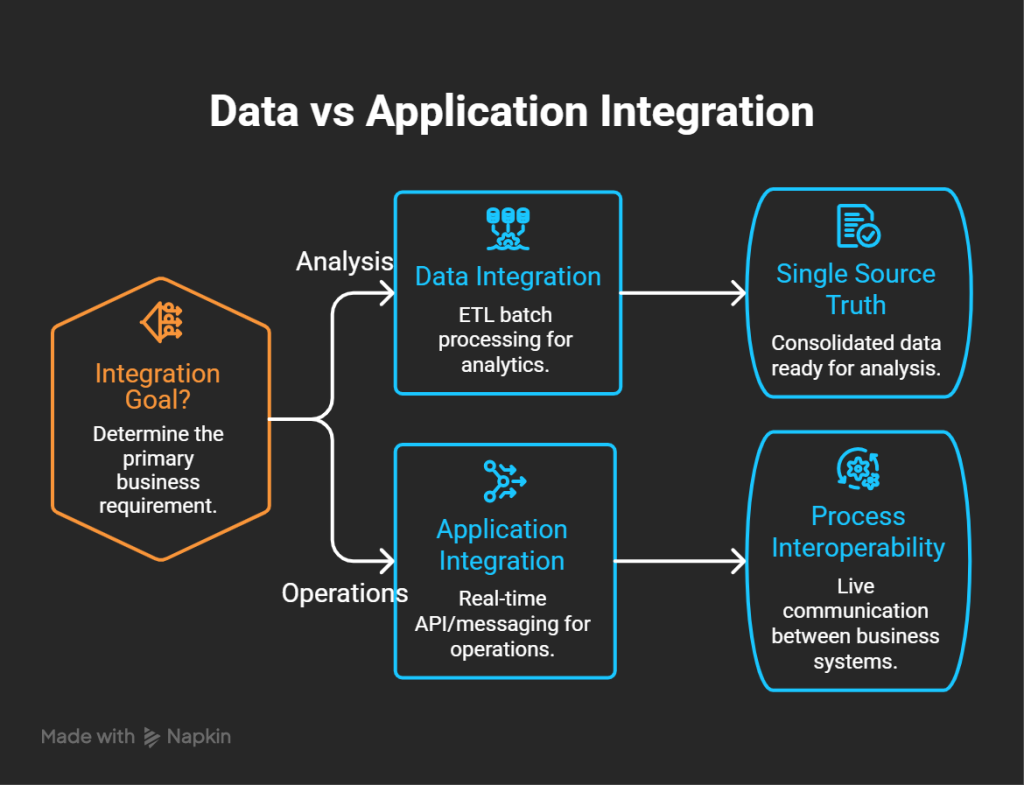
Data integration consolidates information wherever it lives: databases, files, and systems across the organization. Application integration connects specific applications inside the business. The goal of data integration is a single source of truth ready for analysis. The goal of application integration is interoperability that keeps core business processes running.
How Each Handles Data
Data integration extracts, transforms, and loads data into a target using an ETL process; application integration moves data in its native format in real time by connecting applications directly. Put plainly: data integration reshapes data from one source into a form another application recognizes and loads it there, while application integration builds connectors between applications, so they work together and merge data as it flows.
Patterns and Timing
Data integration follows the extract, transform, load pattern to batch-process and move data. Application integration uses API integration and messaging for on-demand, real-time sharing. Data integration usually handles large sets of data at rest, running after the process that created the data finishes. Application integration works in real time with smaller sets, so teams respond to new information the moment it appears.
Complexity and Ownership
Application integration tends to be the harder build, since it coordinates live communication among several systems at once. Data integration gets challenging and resource-heavy when it pulls from many varied sources. Ownership differs too: DevOps runs application integration as part of software operations, while DataOps manages and orchestrates data integration for business use.
When to Use Each
Reach for data integration when you need to combine and analyze static data for business intelligence and keep analytics tools consistent in a single view. Reach for application integration when speed decides the outcome, such as linking Slack to Salesforce so reps follow up on leads faster. Data integration protects accuracy; application integration enables immediate action by capturing data in one app and translating it into another instantly.
How EDI Integration Bridges Both
EDI closes the gap between the two by standardizing how business documents move between organizations and their internal systems. If you are new to EDI, our recent blogs on what EDI integration is and the EDI Systems 101 guide cover the fundamentals.
EDI as a Standardized Data Exchange Format
EDI turns business communication into standardized formats like ANSI X12, EDIFACT, and VDA that let computers exchange documents directly. These standards fix the location and order of every field, giving trading partners a common language. By translating internal data structures into an agreed EDI format, you drop the manual re-keying and let documents process automatically.
EDI Integration with Backend Applications
EDI integration connects your EDI platform to backend systems such as ERP, WMS, TMS, and CRM. That connection routes purchase orders, invoices, and shipping notices straight into your business systems. The mapping matches EDI fields to fields in your target application, translating inbound EDI into internal structures and converting outbound data back into EDI standards. Commport’s EDI ERP integrations handle this for major platforms, including SAP, NetSuite, and Sage.
Direct EDI Integration
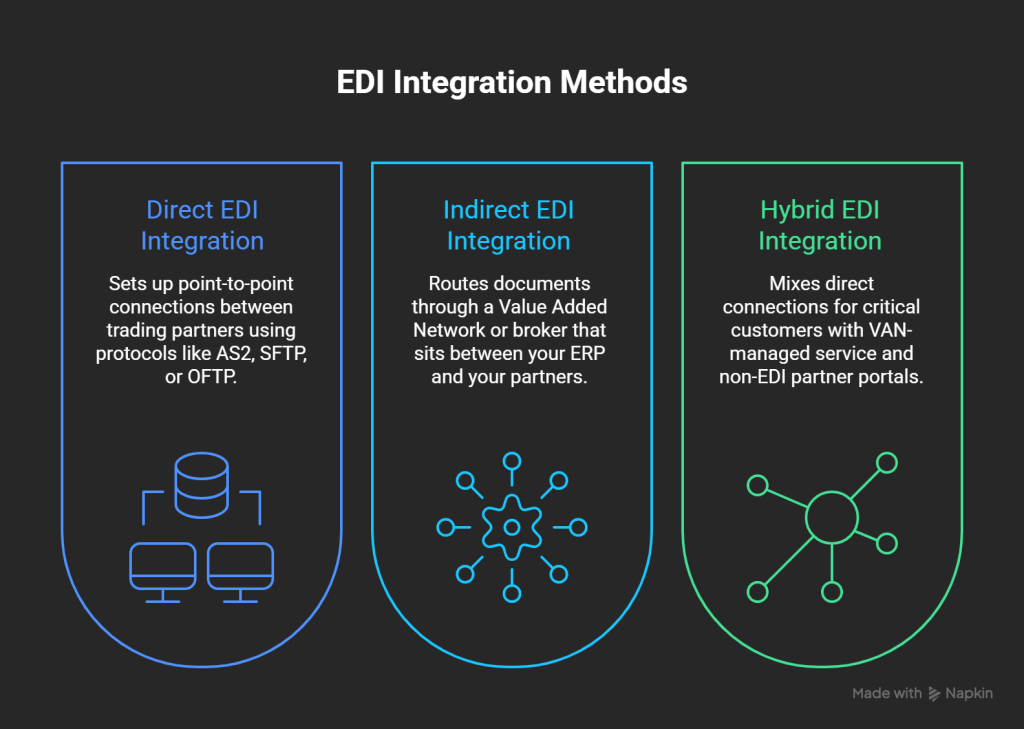
Direct integration sets up point-to-point connections between trading partners using protocols like AS2, SFTP, or OFTP. This end-to-end approach gives you more control and lower per-transaction costs at high volumes. The trade-off: managing thousands of individual partner connections adds complexity, especially when partners run different protocols.
Indirect EDI Integration with VANs
Indirect integration routes documents through a Value Added Network (VAN) or broker that sits between your ERP and your partners. The VAN reformats each message to match what the receiving partner expects. That simplifies partner management, though it brings setup fees, per-transaction fees, and maintenance costs. For a deeper look, see what an EDI VAN is and our EDI and VAN guide.
Hybrid EDI Integration
Hybrid integration mixes direct connections for your most critical customers with VAN-managed service for the rest. It also handles non-EDI partners through web portals, email, PDFs, and flat files, so no partner falls outside the process. Commport’s Integrated EDI Solution and Cloud EDI Solution both support this mixed model.
Implementing a Combined Integration Strategy
A strategy that works addresses platform choice, build sequence, security, and long-term maintenance together rather than one at a time.
Choosing the Right Platform
Your platform choice depends on team capacity, budget, deployment needs, and where your data goals are headed. Weigh ease of use, scalability, compatibility with your current stack, security features, and data quality tooling. Favor platforms with pre-built connectors so you write less custom code per source, and check for self-service access, because business users should manage integrations without filing an IT ticket every day.
Building End-to-End Data Flows
A full pipeline carries raw data from ingestion through processing, storage, and analysis. Ingestion pulls data in through batch loads, streaming, or APIs. Transformation cleanses and standardizes it for compatibility. Orchestration decides when and how data moves between systems. Monitoring keeps the pipeline healthy by catching processing delays and quality gaps early, so teams fix anomalies before they spread.
Security and Compliance
Encrypt data in transit with TLS 1.2 or higher and encrypt it at rest. Use role-based access control for granular permissions and keep detailed audit logs to support compliance. Align with the regulations that apply to you: GDPR, HIPAA, and SOC 2, each of which sets its own rules for sensitive data. Authentication methods like SASL/SCRAM and mutual TLS keep unauthorized clients off the pipeline.
Scalability
Your platform must absorb growing volumes and new sources without slowing down. Incremental sync and event-based triggers cut the wasteful full reloads that pile up on a scale. Serverless options scale on demand with a pay-per-use model that keeps infrastructure costs down.
Common Challenges and Fixes
- Legacy systems without APIs: bridge them with middleware or integration tooling.
- Data silos: standardize on consistent formats and rules across platforms.
- Authentication sprawl: use embedded auth flows that manage the token lifecycle for you.
- API rate limits: add queue-based sync with intelligent throttling.
- Silent failures: run proactive monitoring that alerts you the moment a sync breaks.
Comparison Table: Data Integration vs Application Integration
Attribute | Data Integration | Application Integration |
Primary scope | Consolidates information from disparate systems regardless of location (databases, files, systems) | Connects specific applications and systems within the business |
Core purpose | Creates a single source of truth for analysis | Enables interoperability to support core business processes |
Data handling | Extracts, transforms, and loads into a target system via ETL | Moves data in native format in real time by connecting applications |
Integration pattern | Extract, Transform, Load (ETL) for batch processing | API integration and messaging for on-demand sharing |
Timing | Batch, on large data at rest after the creating process finishes | Real-time, on smaller sets as events occur |
Data volume | Large data sets | Smaller data sets |
Response speed | Scheduled or periodic (hourly, nightly) | Immediate (milliseconds or seconds) |
Complexity | Resource-intensive across many varied sources | Complex setup coordinating several applications at once |
Ownership | DataOps | DevOps |
Best use cases | Combining static data for business intelligence and consistent analytics | Speed-critical links, such as Slack to Salesforce for faster lead follow-up |
Key benefit | Data accuracy and consistency | Immediate action across tools |
Common methods | ETL, ELT, CDC, data virtualization, replication | APIs (REST, SOAP, GraphQL), webhooks, middleware, iPaaS, ESB |
Target systems | Data warehouses, lakes, lakehouses | Connected applications and business systems |
Conclusion
You do not have to choose one approach over the other. Data integration consolidates information for analytics through batch processing. Application integration runs real-time workflows between systems. EDI integration bridges both by standardizing document exchange across organizations and internal applications.
Match the approach to the job. If business intelligence and reporting drive your work, lead with data integration. If real-time automation is the priority, application integration comes first. For most companies, a hybrid model wins, pairing batch consolidation with real-time connectivity. Start by naming your biggest integration pain point, then choose a platform that solves it today and scales tomorrow. If EDI is part of that picture, Commport’s integration team can map the fastest path from your ERP to every trading partner you work with.
Commport's Integrated EDI Solution
Need Help? Download: Commport's EDI Buyers Guide
Unlock the full potential of your supply chain with our comprehensive EDI Buyer's Guide — your first step towards seamless, efficient, and error-free transactions
Frequently Asked Questions
Data integration consolidates information from multiple sources into one view for analysis, typically through batch ETL. Application integration connects software systems, so they share data and trigger workflows in real time. One prepares data for reporting; the other keeps applications working together automatically.
The common methods are ETL, ELT, real-time integration, change data capture, data virtualization, and data replication. ETL and ELT handle batch loads into a warehouse, change data capture keeps systems in sync as records change, and virtualization gives a unified view without physically moving the data.
EDI uses standardized formats like ANSI X12 and EDIFACT to exchange documents between organizations, and it connects to backend systems like ERP and CRM to automate that flow. That dual role means one EDI exchange both standardizes data for consolidation and drives real-time transactions between applications.
Use data integration when you need to combine and analyze static data for business intelligence and keep analytics consistent. Choose application integration when speed matters most, such as syncing customer records between your CRM and communication tools the instant they change.
System integration links IT systems so they operate as one cohesive whole, focused on making different technologies work in harmony. Data integration is narrower: it combines data from different sources into a unified view, emphasizing consolidation and standardization rather than broad system connectivity.
Yes. Many trading partners, especially large retailers and manufacturers, mandate EDI and standards like ANSI X12 or EDIFACT. EDI also guarantees a common document format across thousands of partners, something ad hoc APIs cannot promise. Most companies run EDI and APIs together rather than replacing one with the other.
Both work. Direct connections through AS2 or SFTP give you control and lower per-transaction costs at high volume. A VAN simplifies managing many partners by handling reformatting and routing for a fee. Hybrid setups use direct links for key partners and a VAN for the rest.