Introduction
EDI OCR integration bridges the data integration gap between physical documents and electronic data interchange by combining OCR technology with EDI systems.
Specifically, OCR AI converts physical documents (PDF to OCR, text to OCR) into structured data that EDI systems can automatically exchange between trading partners.
The integration bridges the gap between the 1.2 trillion documents exchanged annually and the mere 15% currently automated through EDI, offering a scalable solution that grows with your business without proportional cost increases.
In this blog, we’ll walk you through how this integration works, implementation steps, and real-world applications that can transform your document processing workflow.
In the end, we will recommend one of the best EDI OCR products, Commport Doc2EDI, powered by Photon Commerce, which has 99.99% data accuracy and reliability, one of the best in the industry, which other OCR products cannot match.
Key Takeways
- OCR alone requires manual verification for over 50% of documents – Integration with EDI eliminates this bottleneck through automated validation and structured data exchange
- Combined systems reduce errors by 90-95% – Manual data entry produces 1-5% error rates while intelligent document processing achieves just 0.1-0.5% errors
- Processing times drop from days to minutes – Organizations report 80% reduction in manual work and up to 99% automation rates in document workflows
- Implementation requires strategic partner segmentation – Assess trading partners by volume to determine optimal mix of full EDI, Web EDI, and OCR-only solutions
- Real-world results prove ROI quickly – freight forwarders save 180+ labor hours weekly, and AP teams cut data entry by 80%
Understanding OCR and EDI: The Foundation Technologies
What is OCR Technology and How It Works
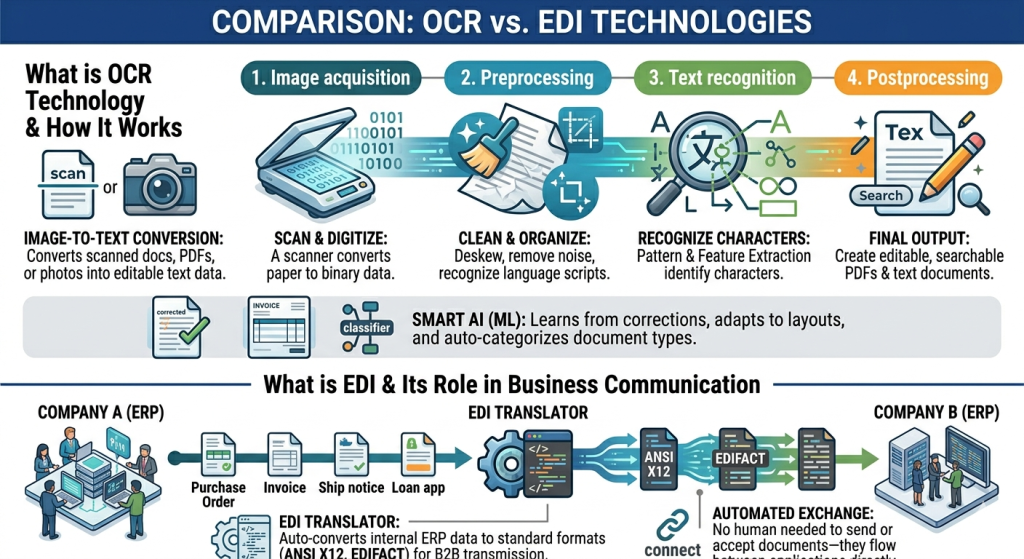
Optical Character Recognition converts images of text into a machine-readable text format. When you scan a form or receipt, your computer saves it as an image file. You cannot edit, search, or count words in that image. OCR technology transforms that static image into editable text data.
The OCR process operates through four distinct phases:
- Image acquisition: A scanner reads documents and converts them to binary data, classifying light areas as background and dark areas as text
- Preprocessing: The software cleans the image by deskewing tilted scans, despeckling digital noise, removing boxes and lines, and recognizing scripts for multi-language documents
- Text recognition: OCR employs two algorithms—pattern matching isolates character images and compares them with stored glyphs, while feature extraction breaks characters into lines, loops, and intersections to find the best match
- Postprocessing: The system converts extracted text into machine-readable documents, often creating annotated PDFs with before and after versions
At its core, OCR acts as a technology that converts scanned paper documents, PDF files, or digital camera images into editable and searchable data. Advanced OCR systems incorporate machine learning algorithms that learn from user corrections, adapt to specific invoice layouts, and recognize patterns to automatically categorize different document types.
What is EDI and Its Role in Business Communication
Electronic data interchange refers to systems and standards for electronically transmitting business data and documents between organizations’ computer systems. Explicitly, EDI automates document exchange, so no people are needed to send or accept documents—they flow between systems automatically.
In EDI transactions, information moves directly from a computer application in one organization to a computer application in another. Businesses use EDI to share purchase orders, invoices, advance ship notices, loan applications, and numerous other document types.
The EDI process involves creation, conversion, sending, retrieval, and integration of business documents. An EDI translator automatically pulls data from internal systems like enterprise resource planning platforms, converts it into standardized formats such as ANSI X12 or EDIFACT, and transmits it through direct connections or value-added networks
Key Differences Between OCR and EDI
OCR technology digitizes physical documents into machine-readable text, while EDI enables standardized electronic exchange between business systems. OCR handles the reading and extraction process. EDI manages the transmission and integration across organizational boundaries.
OCR processes various document formats—scanned papers, PDFs, digital images—and outputs structured data. On the other hand, EDI uses standardized formats to ensure both sender and receiver computer systems can read and understand documents.
How OCR and EDI Integration Work Together
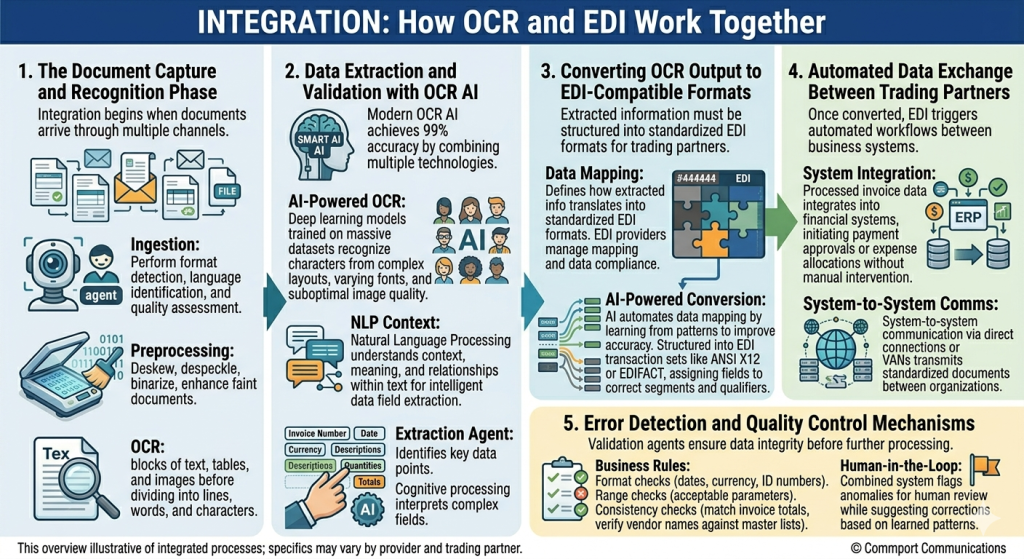
1. The Document Capture and Recognition Phase
The integration process begins when documents arrive through multiple channels: scanned paper forms, email attachments, or digital files. An ingestion agent performs initial format detection, language identification, and quality assessment upon document arrival. This preprocessing step proves critical for downstream accuracy.
Following ingestion, the preprocessing agent enhances document quality through deskewing misaligned scans, despeckling noise, binarization for optimal contrast, and image enhancement for faint documents. OCR technology then analyzes document structure by identifying blocks of text, tables, and images before dividing content into lines, words, and individual characters.
2. Data Extraction and Validation with OCR AI
Modern OCR AI systems combine multiple technologies to extract data. Advanced AI-powered OCR achieves this by leveraging deep learning models trained on massive datasets to recognize characters from complex layouts, varying fonts, and suboptimal image quality. Natural Language Processing enables the system to understand context, meaning, and relationships within text, allowing intelligent data field extraction even when information appears in different locations or formats.99% accuracy
The extraction agent identifies key data points from invoices, orders, and shipping documents. For invoices specifically, OCR captures essential details like, along with line item breakdowns including descriptions, quantities, unit prices, and totals. Cognitive processing interprets complex fields such as tax amounts, account numbers, and remittance addresses. Invoice numbers, dates, and currency
3. Converting OCR Output to EDI-Compatible Formats
Data mapping defines how extracted information translates from OCR output into standardized EDI formats that trading partners require. EDI providers manage this mapping process, ensuring outgoing data complies with partner EDI requirements while converting incoming EDI data into formats your ERP system can process.
The conversion involves AI automating data mapping by learning from patterns to improve accuracy. Extracted information is structured into EDI transaction sets like ANSI X12 or EDIFACT, with each data field assigned to the correct segment and qualifier within the standardized format.
4. Automated Data Exchange Between Trading Partners
Once converted, EDI integration triggers automated workflows between business systems. The processed invoice data integrates into financial systems, initiating payment approvals or expense allocations without manual intervention. System-to-system communication occurs through direct connections or value-added networks, transmitting standardized documents between organizations.
5. Error Detection and Quality Control Mechanisms
Validation agents apply comprehensive business rules to verify extracted data. Format checks ensure adherence to specified formats for dates, currency, and ID numbers. Range checks verify numerical values fall within acceptable parameters. Consistency checks cross-reference extracted data with other document fields or external databases, matching invoice totals and verifying vendor names against master lists. The combined system flags anomalies or potential errors for human review while suggesting corrections based on learned patterns.
Step-by-Step Implementation of EDI OCR Integration
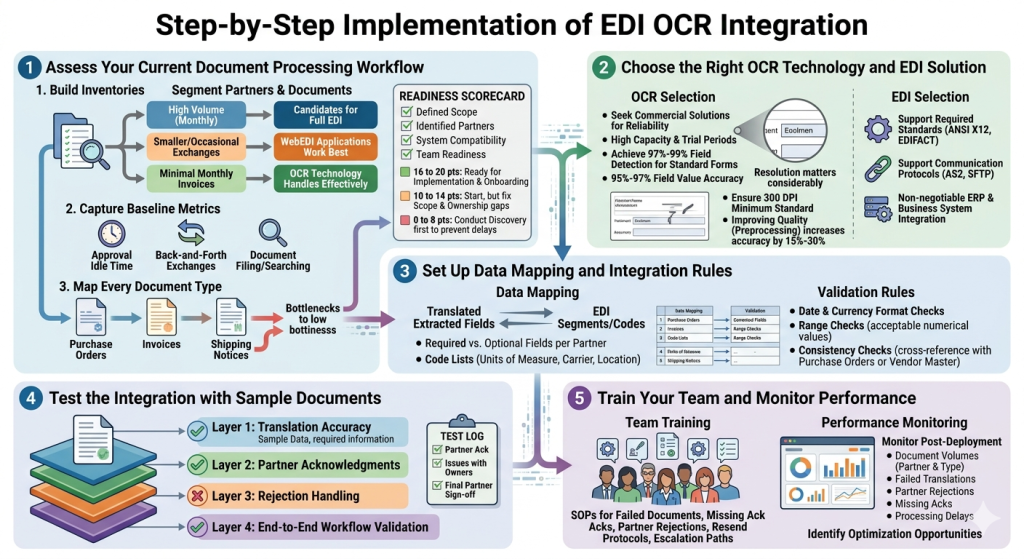
Step 1: Assess Your Current Document Processing Workflow
Building partner and document inventories forms the foundation of successful EDI OCR integration. Specifically, need to segment your supplier and customer network into three distinct groups.
- The first group comprises partners exchanging large document volumes monthly, making them ideal candidates for full EDI implementation.
- The second group consists of smaller trading partners with occasional exchanges, where WebEDI applications work best.
- The final group includes partners sharing minimal invoices monthly, where OCR technology handles their needs effectively.
Before moving forward, capture baseline metrics. Time how long average approvals sit idle, count back-and-forth exchanges on single invoices, and log hours spent filing or searching documents. Map every document type (purchase orders, invoices, shipping notices), identify who owns each, and chart every hand-off with timestamps to reveal bottlenecks.
A readiness scorecard helps spot gaps early. Scoring on factors like defined scope, identified trading partners, system compatibility, and team readiness reveals implementation preparedness. Interpreting the results guides next steps:
- 16 to 20 points: Ready to start implementation planning and partner onboarding
- 10 to 14 points: Start, but fix gaps in scope and ownership immediately
- 0 to 8 points: Conduct discovery first to prevent timeline delays
Step 2: Choose the Right OCR Technology and EDI Solution
Commport Doc2EDI offers adequate trial periods, demos for sufficient document processing capacity, and pay-as-you-go pricing models with 95% to 97% field value accuracy for clear printed text. 97% to 99% field detection rates.
Resolution matters considerably. Ensure source documents meet the 300 DPI minimum standard for optimal OCR results. Research shows that improving input image quality through preprocessing increases OCR accuracy by 15% to 30% for challenging documents.
For EDI solutions, verify support for required standards (ANSI X12, EDIFACT) and communication protocols (AS2, SFTP). Integration capabilities with existing ERP and business systems prove non-negotiable.
Step 3: Set Up Data Mapping and Integration Rules
Mapping translates extracted OCR fields into EDI segments and codes. I create field mapping tables showing source fields mapped to target segments and elements. I distinguish required versus optional fields per partner and compile code lists covering units of measure, carrier codes, and location identifiers.
Validation rules prevent downstream issues. I implement format checks for dates and currency, range checks verifying numerical values fall within acceptable parameters, and consistency checks cross-referencing extracted data with purchase orders or vendor master lists.
Step 4: Test the Integration with Sample Documents
Analyze sample EDI data obtained from trading partners to identify required enveloping information. Testing happens in layers: translation accuracy, partner acknowledgments, rejection handling, and end-to-end workflow validation. Maintain test transaction logs, document partner acknowledgments, track issues with assigned owners, and secure final partner sign-off before deployment.
Step 5: Train Your Team and Monitor Performance
Establish standard operating procedures covering failed document handling, missing acknowledgments, partner rejections, resend protocols, and escalation paths. Post-deployment, monitor document volumes by partner and type, failed translations, partner rejections, missing acknowledgments, and processing delays to identify optimization opportunities.
OCR EDI Real-World Applications and Use Cases
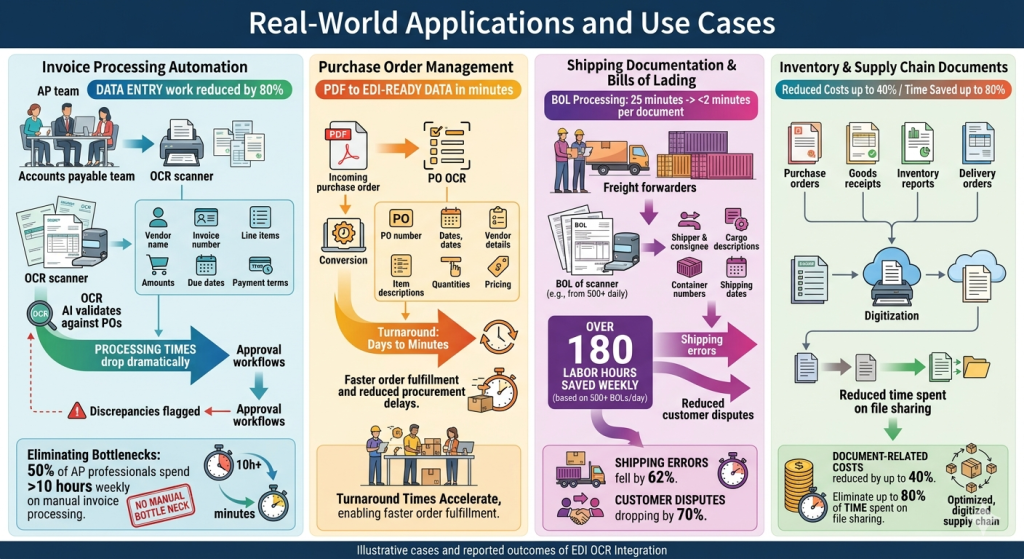
1. Invoice Processing Automation
Accounts payable teams reduce data entry work by 80% when implementing EDI OCR integration. The technology extracts vendor names, invoice numbers, line items, amounts, due dates, and payment terms automatically. Processing times drop dramatically as OCR AI validates invoice data against purchase orders and flags discrepancies before they reach approval workflows. Organizations eliminate the manual bottleneck of 50% of AP professionals spending over 10 hours weekly on invoice processing.
2. Purchase Order Management
Purchase order OCR processes PDF documents and converts them into EDI-ready data within minutes. The system captures PO numbers, dates, vendor details, item descriptions, quantities, and pricing. Turnaround times accelerate from days to minutes, enabling faster order fulfillment and reducing procurement cycle delays.
3. Shipping Documentation and Bills of Lading
Freight forwarders cut bill of lading processing from 25 minutes to under 2 minutes per document. With 500+ BOLs processed daily, this translates to over 180 labor hours saved weekly. The OCR technology extracts shipper and consignee details, cargo descriptions, container numbers, and shipping dates with precision. Manufacturing companies report shipping errors falling by 62% and customer disputes related to shipping documentation dropping by 70%.
4. Inventory and Supply Chain Documents
Supply chain document digitization reduces document-related costs by up to 40% and eliminates up to 80% of time spent on file sharing. OCR processes purchase orders, goods receipts, inventory reports, and delivery orders automatically.
Conclusion
You now have a complete roadmap to implement EDI OCR integration and eliminate manual document processing bottlenecks. Indeed, combining these technologies delivers what neither can achieve alone: true end-to-end automation from document capture to system integration.
Start by assessing your current workflow and identifying high-volume trading partners. Choose OCR and EDI solutions that meet your accuracy requirements and business needs. Above all, focus on proper data mapping and validation rules during setup.
The payoff is substantial: 90-95% fewer errors, 80% less manual work, and processing times cut from days to minutes. Your investment in integration will compound in the long run as document volumes scale without proportional cost increases.
Commport Doc2EDI - AI-Powered OCR Technology That Converts Physical Documents into Actionable EDI Data With 99.99% Accuracy & Reliability
Frequently Asked Questions
OCR (Optical Character Recognition) digitizes physical documents and images into machine-readable text, while EDI (Electronic Data Interchange) enables standardized electronic exchange of business documents between computer systems. OCR handles the reading and extraction process from various document formats, whereas EDI manages the transmission and integration of data across organizational boundaries using standardized formats.
OCR alone requires manual verification for over 50% of processed documents and cannot understand context or validate business logic. EDI systems require clean, structured data inputs and cannot process physical documents or PDFs without manual data entry. Combining both technologies creates continuous automation from physical document receipt through system integration, eliminating the bottlenecks that exist when using either technology independently.
Manual data entry typically produces error rates between 1% and 5%, while intelligent document processing using EDI OCR integration achieves error rates of just 0.1% to 0.5%. This represents a 90% to 95% reduction in errors, with some organizations reporting automation rates up to 99% in their document processing workflows.
EDI OCR integration can automate various business documents including invoices, purchase orders, shipping documentation and bills of lading, inventory reports, supply chain documents, and healthcare claims. The technology extracts key data points such as vendor names, invoice numbers, line items, amounts, dates, and payment terms, then converts this information into standardized EDI formats for automated exchange.
Processing times drop dramatically with EDI OCR integration. Purchase orders that previously took days can be processed in minutes, while bills of lading processing time reduces from 25 minutes to under 2 minutes per document. Accounts payable teams can reduce data entry work by 80%, and organizations save significant labor hours by eliminating manual document handling and verification steps.